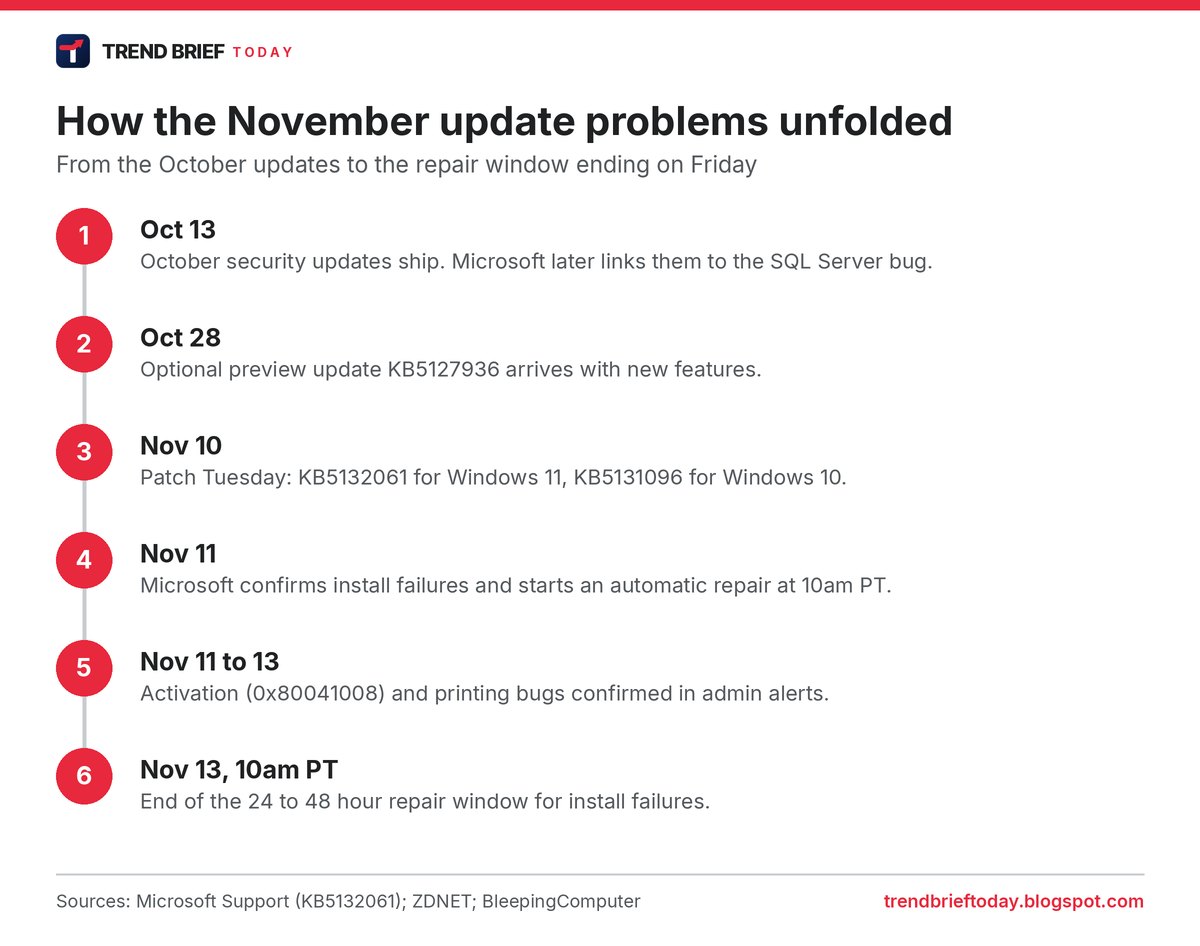
Microsoft has confirmed four separate problems linked to this month's Windows updates: the November security update failing to install on some Windows 11 PCs, a Windows activation error 0x80041008, printing failures for some documents, and SQL Server connections piling up on servers.[1][2][4][7][10] For most home users only the first one matters, and Microsoft says an automatic repair should reach affected PCs within 24 to 48 hours of 10am Pacific on November 11, which means by Friday, November 13.[1][2][3]
 | |
| Update | KB5132061 (Windows 11 24H2, 25H2, 26H2), KB5131096 (Windows 10)[1][3][12] |
|---|---|
| Released | Tuesday, November 10, 2026 (Patch Tuesday)[1][3] |
| Install errors | 0x80070306, 0x800f0989, 0x800f0993[1][2][3] |
| Install fix | Automatic repair, 24 to 48 hours from Nov 11, 10am PT[1][2][3] |
| Activation error | 0x80041008, Invalid parameter (SWbemObjectEx)[4][5][6] |
| Printing | Fails for documents with zero-size images[7][8] |
| SQL Server | Linked server connections stay open; out-of-band fix due[10][11] |
| Fixed this month | USB audio devices failing after the September update[10][12] |
The four problems at a glance
The November update is not one bug. It is four different issues that hit different groups of users, and each one is at a different stage of being fixed.[1][4][7][10]
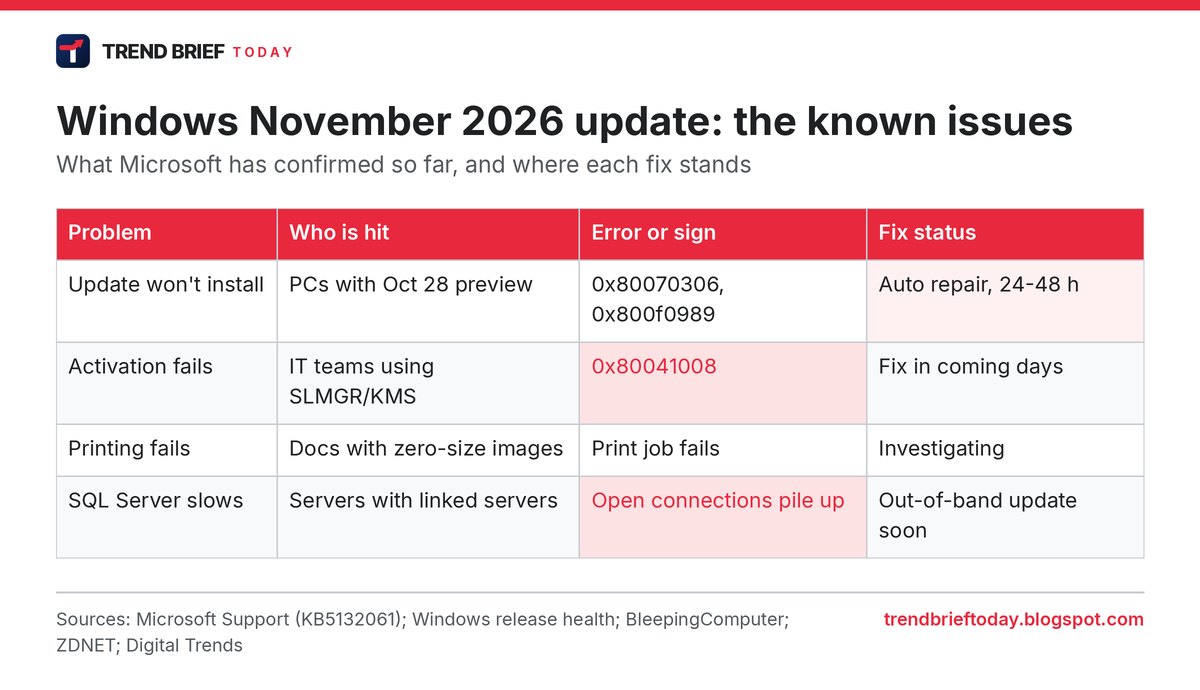
The install failure is the one most likely to show up on an ordinary Windows 11 laptop. The activation and SQL Server bugs land mostly on IT departments and servers, and the printing bug depends on what kind of document you are printing.[3][4][5][7]
Problem 1: the November update won't install
On its support page for KB5132061, Microsoft says some devices "might be unable to complete the installation" of the November security update. Affected PCs may try to install it again and again, or show error code 0x80070306, 0x800f0989 or 0x800f0993.[1][2]
The cause is the optional preview update Microsoft released on October 28, KB5127936, which brought features such as a customisable right-click menu.[2][3] Microsoft says the problem affects "a limited number of devices" that installed that preview, and that PCs which skipped it are not affected.[1][2] ZDNET's Lance Whitney said he reproduced the failure on a Windows 11 virtual machine that had the preview installed.[3]
The fix does not need any action from users. Microsoft says the repair runs automatically on PCs that are online and use Windows Update, and that "all affected devices should be repaired in 24 to 48 hours starting from November 11, 2026, 10am PT". After the repair, the November update downloads and installs by itself.[1][2] ZDNET said the update then installed "without a hitch" on its test machine.[3]
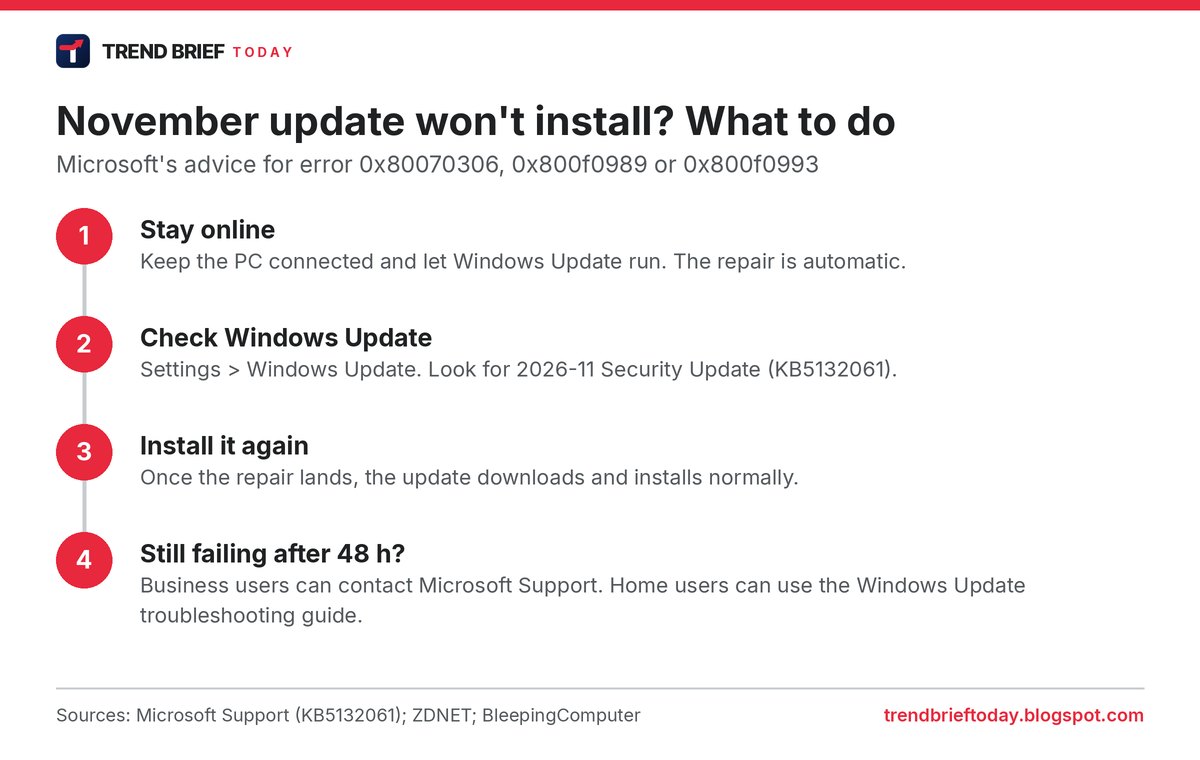
If the update still fails after 48 hours, Microsoft tells business customers to contact Microsoft Support.[1][2] Home users can work through Microsoft's general guide to troubleshooting Windows Update problems, which ZDNET points to.[3]
Problem 2: Windows activation error 0x80041008
The second problem is with activation. In a service alert for administrators, Microsoft said affected devices "might encounter error 0x80041008, Invalid parameter (SWbemObjectEx), when running commands to activate Windows, configure Key Management Service (KMS), or manage product keys."[4][5][6]
The error shows up after running two specific Software Licensing Management Tool commands, slmgr.vbs /skms-domain and slmgr.vbs /ipk. BleepingComputer and Digital Trends list the affected versions as Windows 10 21H2 and 22H2, Windows 11 23H2, and Windows Server 2019, 2022 and 2025.[4][5]
Most people can ignore this one. Microsoft said: "Devices that are already activated remain activated." It added that devices which already have the right KMS client key and configuration, and do not need to run those commands, "are not expected to be affected", and that KMS-activated devices "typically remain activated for up to 180 days following successful activation."[4][5]
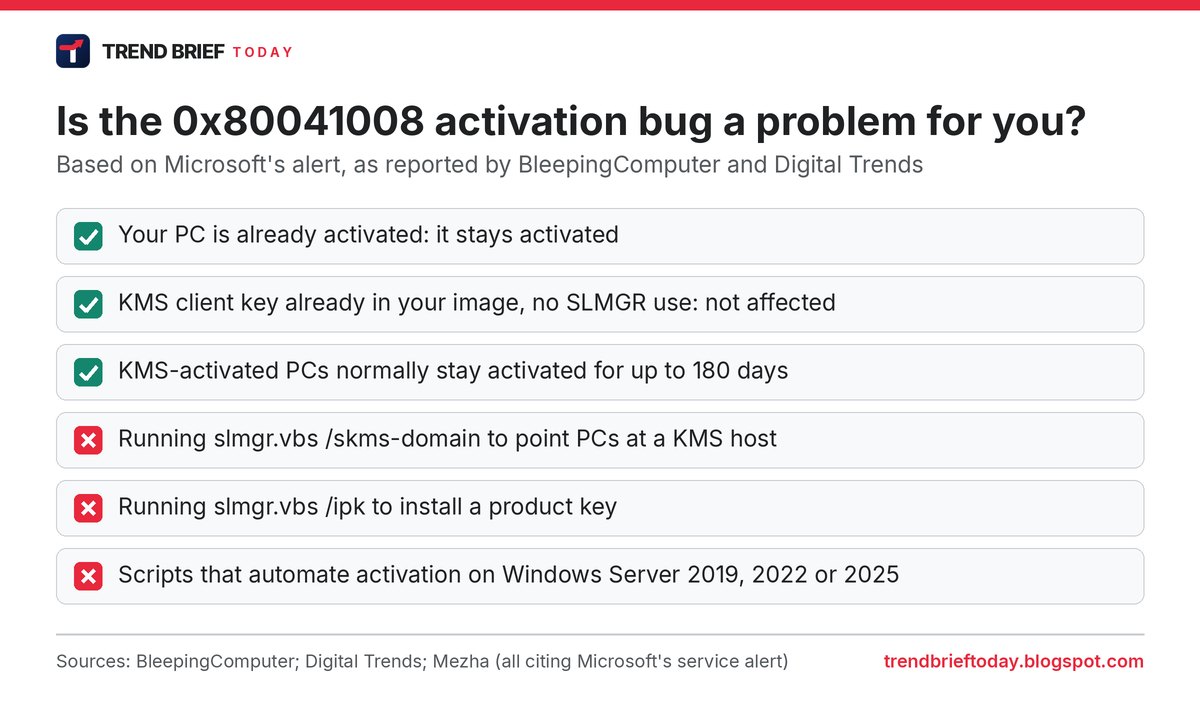
Microsoft says a fix will arrive "over the coming days". Organisations that need a workaround now are told to contact Microsoft Support for business.[4][5][6]
Problem 3: printing fails for some documents
Microsoft has also warned that after the November 2026 security update, "printing might fail for documents containing images rendered with a height or width value of zero at the selected printing resolution."[7][8]
That sounds rare, but such images are common in complex layouts. Microsoft gives examples such as "invisible" images used as a watermark, for layout anchoring, or added by document-generation tools even when no picture is visible.[7][8] The bug mainly affects Microsoft Word documents printed through the Windows Graphics Device Interface (GDI), but it can also hit other apps. It affects Windows 10 and later on PCs and Windows Server 2016 and later on servers.[7][8] The Register also reported the issue under the headline "Microsoft has an image problem with November's Windows security update".[9]
Microsoft has not given a fix date yet. Mezha reports that the company is investigating and will share more information when it has it.[8]
Problem 4: SQL Server slowdowns on servers
The fourth issue started earlier, with the October 13 updates, but Microsoft only confirmed it on November 11. On server devices, connections created by SQL Server linked server queries "might remain open after the queries complete", so connections to external databases such as Oracle and PostgreSQL build up and slow the server down over time.[10][11]
Closing idle connections or restarting the SQL service gives temporary relief, but Microsoft warns that this can interrupt active queries and the problem can come back. A mitigation is available through Microsoft Support for business, and Microsoft says it will fix the bug with "an out-of-band update that will be released in the next few days."[10][11]
What the November update did fix
There is some good news in the same update. A bug from the September 8 update that left some USB Audio Class 1.0 devices failing to start, with a "Code 10" error in Device Manager or no sound at all, is marked as resolved by the November security updates, KB5132061 on Windows 11 and KB5131096 on Windows 10.[10][12] The November release also patched an Outlook zero-day that attackers were already using, which is why security teams want it installed rather than paused. Our Patch Tuesday November 2026 explainer covers those security fixes.
These update bugs are separate from the Microsoft 365 outage that has disrupted Outlook, Teams and other cloud services since Thursday. That outage is a server-side problem at Microsoft and has nothing to do with what is installed on your PC. We are tracking it in our Outlook outage live explainer.
Should you install the November update?
For most people, yes. If it fails with one of the three install errors, the fix is to wait for the automatic repair rather than uninstall anything.[1][3] Businesses that rely on scripted KMS activation, print complex Word documents in bulk, or run SQL Server linked servers may want to test before rolling it out widely, or ask Microsoft Support for the mitigations it is offering.[4][7][10]
Frequently asked questions
Why won't the Windows 11 November 2026 update install?
If your PC installed the October 28 preview update KB5127936, the November update KB5132061 can fail with 0x80070306, 0x800f0989 or 0x800f0993. Microsoft is pushing an automatic repair through Windows Update within 24 to 48 hours of November 11, 10am PT.[1][2][3]
What is error 0x80041008 in Windows?
It is an activation error, "Invalid parameter (SWbemObjectEx)", that can appear after the November update when running slmgr.vbs commands to set up KMS activation or install a product key. Already activated PCs stay activated.[4][5]
Will the November update deactivate Windows?
No. Microsoft says devices that are already activated remain activated. The bug only affects new activation or key changes done with SLMGR.[4][5]
Why can't I print after the Windows update?
The November update can make printing fail for documents that contain images with zero height or width, often used as hidden watermarks or layout anchors in Word files. Microsoft is investigating.[7][8]
When will Microsoft fix these problems?
The install failure repair should be done by about 10am PT on November 13. Microsoft says the activation fix will come in the coming days and the SQL Server fix in an out-of-band update in the next few days. No date has been given for the printing fix.[1][4][8][10]
References
- "November 10, 2026, KB5132061 (OS Builds 26200.9974 and 26100.9974)", Microsoft Support, accessed 13 November 2026.
- "Microsoft confirms Windows security updates installation issues", BleepingComputer, 12 November 2026.
- "If the November Windows update fails to install on your PC, here's what to do", Lance Whitney, ZDNET, 12 November 2026.
- "Microsoft confirms Windows activation failures after November updates", BleepingComputer, 13 November 2026.
- "Microsoft's latest Windows update is breaking activation for some business PCs", Rachit Agarwal, Digital Trends, 13 November 2026.
- "Microsoft confirms Windows activation failures after November updates", Mezha, 13 November 2026.
- "Microsoft says November security updates cause printing issues", BleepingComputer, 13 November 2026.
- "Microsoft says November 2026 security updates may disrupt printing", Mezha, 13 November 2026.
- "Microsoft has an image problem with November's Windows security update", The Register, 12 November 2026 (headline).
- "Windows 11, version 24H2 known issues and notifications", Windows release health, Microsoft Learn, accessed 13 November 2026.
- "Microsoft: Recent Windows updates cause SQL Server performance issues", BleepingComputer, 12 November 2026.
- "Windows 10, version 22H2 known issues and notifications", Windows release health, Microsoft Learn, accessed 13 November 2026.