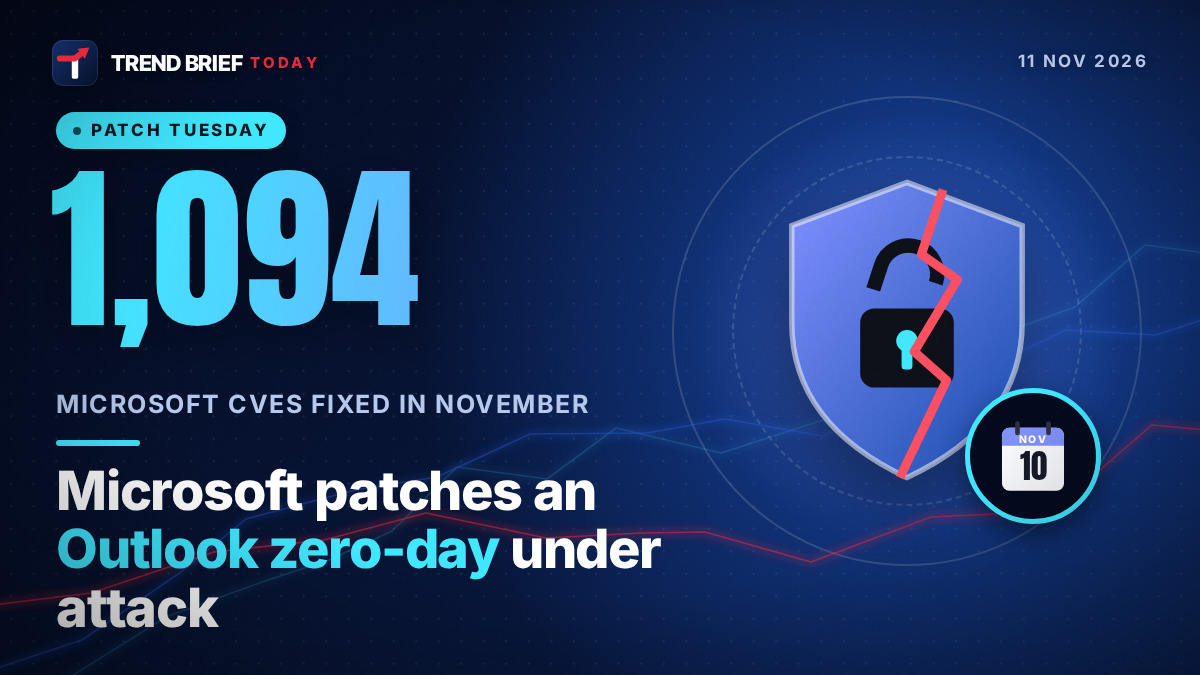
Microsoft's November 2026 Patch Tuesday, released on November 10, fixes one Outlook zero-day that attackers are already using: CVE-2026-124194, a flaw that can leak your Windows NTLMv2 password hash when you open a booby-trapped message file. The total number of fixes is somewhere between about 1,090 and 1,259, depending on who is counting. Home users should run Windows Update (KB5132061 on most Windows 11 PCs) and update Office, and US federal agencies have until November 24 to patch the Outlook bug.[1][3][9]
 | |
| Released | Tuesday, November 10, 2026 |
|---|---|
| Fixes | About 1,090 Microsoft CVEs (1,092 to 1,094 by most counts); 1,235 to 1,259 with Edge and third-party CVEs |
| Critical | 63 (Krebs, Qualys, Tenable); 66 (BleepingComputer) |
| Exploited zero-day | CVE-2026-124194, Microsoft Outlook spoofing |
| Outlook CVSS | 6.5 (Moderate) |
| Publicly disclosed | None this month |
| CISA deadline | November 24, 2026 (US federal agencies) |
| Windows 11 | KB5132061 (24H2, 25H2, 26H2), KB5131087 (23H2) |
| Windows 10 | KB5131096 (ESU and LTSC only), build 19045.7846 |
| Next Patch Tuesday | December 8, 2026 (second Tuesday) |
What happened
Microsoft shipped its monthly security updates on Tuesday, November 10. It is the second month in a row with more than 1,000 fixes. The headline item is a single bug that Microsoft marks as "Exploitation Detected": CVE-2026-124194 in Outlook. No other flaw this month is known to be under attack, and none were made public before the patches came out.[2][5][7]
On the same day, the US Cybersecurity and Infrastructure Security Agency (CISA) added the Outlook flaw to its Known Exploited Vulnerabilities catalog. That gives US federal civilian agencies a deadline of November 24, 2026 to fix it. CISA's list is binding only on those agencies, but many companies in the US, UK, Canada and Australia use it to decide what to patch first.[9][3]
The Outlook zero-day, CVE-2026-124194
Microsoft calls it a spoofing vulnerability, but the real effect is credential theft. According to Microsoft's advisory, an attacker sends a specially crafted message file and gets the victim to open it in Outlook. Outlook then connects to a network location the attacker controls, without showing the usual warning about external content. That connection hands over the user's NTLMv2 hash.[1][4]
An NTLMv2 hash is not your password, but it is close enough to be dangerous. Rapid7 says an attacker can relay it straight away to log in as you on another service that lacks protections such as SMB or LDAP signing, or try to crack it offline to recover the password itself.[5] BleepingComputer notes that the same trick, a malicious attachment that makes Windows reach out to an attacker's server, has been used in phishing campaigns before.[1]
- Severity: Moderate, CVSS 6.5. Researchers at the Zero Day Initiative and Rapid7 both warn that the low score undersells it, because it is already being exploited.[5][6]
- Preview Pane: not an attack path. The victim has to open the file.[4][6]
- Affected: Microsoft 365 Apps for Enterprise, Office LTSC 2021 and Office LTSC 2024, according to the advisory as reported by SecurityWeek and Notebookcheck.[4][11] Rapid7 says all supported versions of classic Outlook get the patch.[5]
- Who found it: Microsoft credits a researcher using the name "nono" and Benoît Sevens. The acknowledgment for Sevens mentions Anthropic's Claude AI model.[3][4][11]
- Attacks: Microsoft has not named a threat group or explained how the bug is being used.[3][4]
An AI model being credited for an exploited Office bug fits a pattern this year. Microsoft itself has said AI is helping it find and fix far more bugs than before, which is part of why the monthly totals have exploded.[1][2] For background on the AI tools now competing with Microsoft's own apps, see our report on Microsoft stock and Anthropic's Claude Sheets.
Why the flaw counts don't match
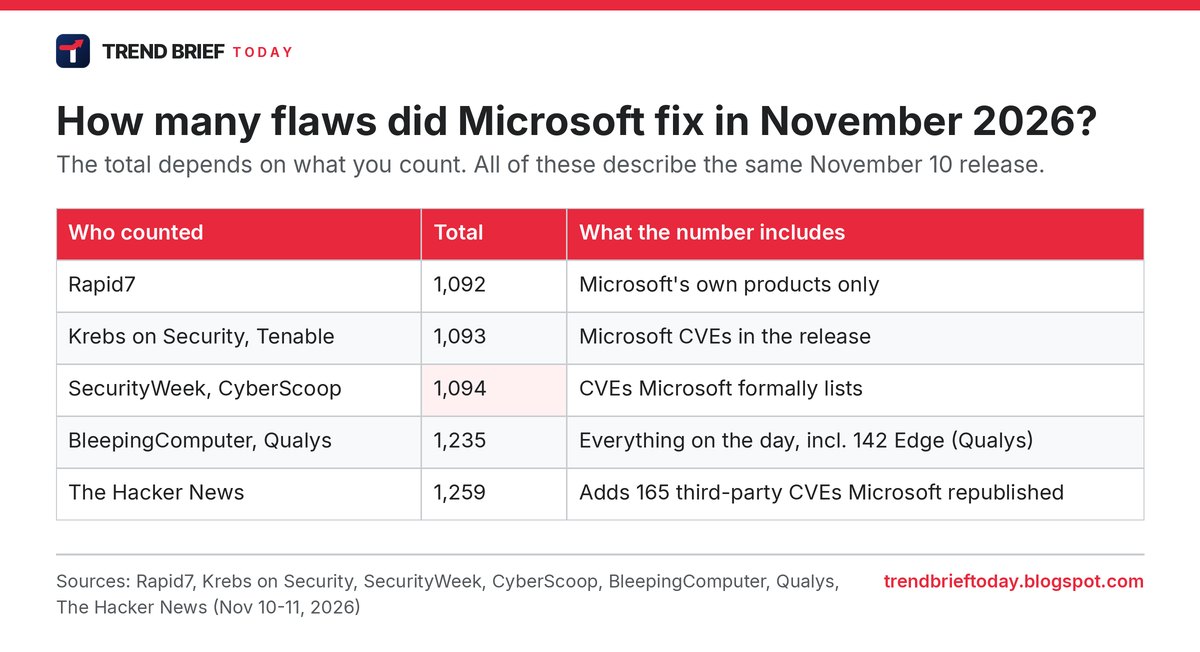
If you read three news stories about this release, you may see three different totals. They are all describing the same updates. The difference is what each outlet counts.[1][3][4]
- About 1,090: Microsoft's own product CVEs. Rapid7 counts 1,092, Krebs on Security and Tenable 1,093, and SecurityWeek and CyberScoop 1,094.[2][4][5][7]
- 1,235: BleepingComputer and Qualys count everything Microsoft published on the day. Qualys says 142 of the entries are for the Chromium-based Edge browser. BleepingComputer leaves out 108 fixes released earlier in the month.[1][8]
- 1,259: The Hacker News includes 165 CVEs from other vendors that Microsoft republished in its update guide.[3][4]
The critical count also differs: 63 by Krebs, Qualys and Tenable, 66 by BleepingComputer.[1][2][8] The Zero Day Initiative put it plainly, saying the overall count "is a bit confusing" and asking whether the exact number even matters.[6]
For scale, October's release was even bigger, at 1,411 (BleepingComputer) or 1,413 (SecurityWeek). Krebs says Microsoft has now shipped more than 5,100 security fixes in 2026, at a time when it was averaging around 100 a month a year ago. Tenable's Satnam Narang gave The Hacker News the same 5,100 figure.[1][2][3][4]
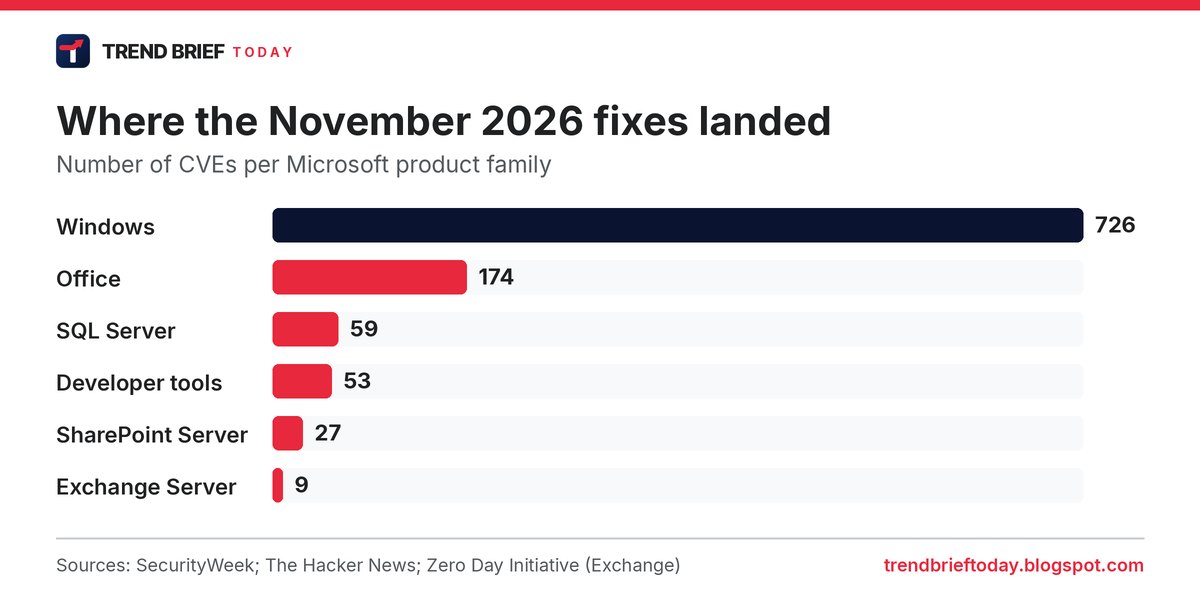
Windows took the largest share with 726 CVEs, followed by Office with 174, SQL Server with 59, developer tools with 53 and SharePoint Server with 27. Exchange Server got nine.[3][4][6]
Other critical flaws to patch first
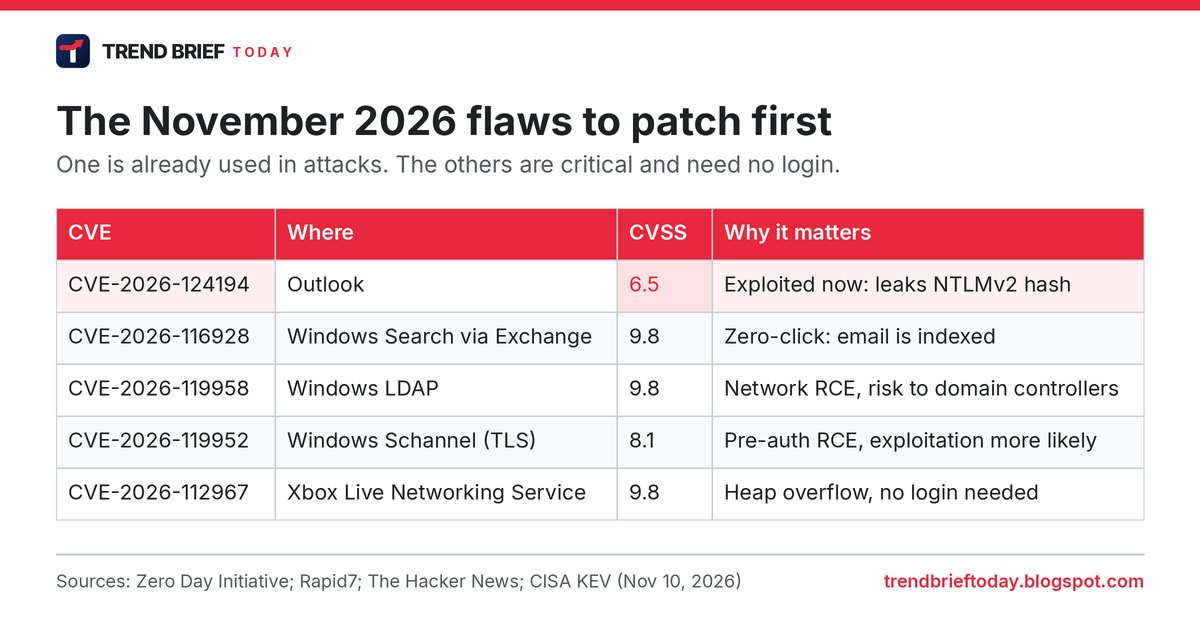
None of these are known to be exploited yet, but each lets an attacker run code over a network without logging in. The CVSS scores below match in both the Zero Day Initiative and Rapid7 tables.[5][6]
| CVE | Component | CVSS | Notes |
|---|---|---|---|
| CVE-2026-116928 | Windows Search (via Exchange Server) | 9.8 | An email attachment triggers it when Exchange indexes the message, so nobody has to open anything. ZDI's Dustin Childs called it "a zero-click code execution bug on a high-value target".[6][7] |
| CVE-2026-119958 | Windows LDAP | 9.8 | Out-of-bounds write reached with crafted LDAP calls. Childs warned it could be "quite destructive, especially on Domain Controllers".[6][7] |
| CVE-2026-119952 | Windows Schannel (TLS) | 8.1 | Pre-authentication code execution. Microsoft rates it "Exploitation More Likely" despite the high attack complexity.[5][6] |
| CVE-2026-112967 | Xbox Live Networking Service | 9.8 | Heap overflow with no login or user action needed.[3][6] |
| CVE-2026-95962 | Windows Virtual Filtering Platform | 9.0 | Use-after-free reached with a crafted network packet.[3][6] |
The Zero Day Initiative counted 30 November CVEs that it considers potentially wormable, down from 59 in October. Five of them are in Windows Message Queuing.[6] Qualys also flags critical bugs in Excel, Word and Hyper-V.[8]
Windows 11 and Windows 10 updates
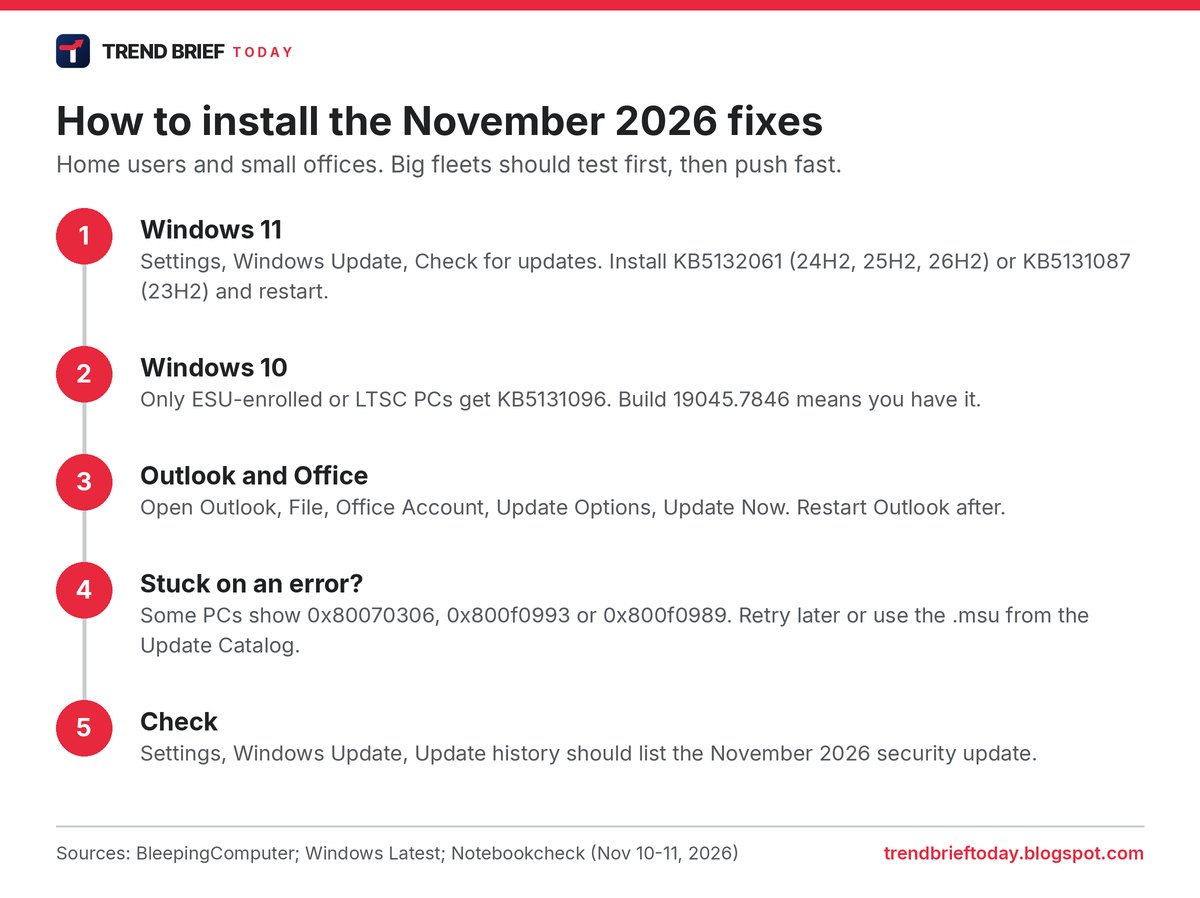
Windows 11: the November cumulative update is KB5132061 for versions 24H2, 25H2 and 26H2, and KB5131087 for 23H2. It is a mandatory security update.[10][12] Windows Latest reports the builds as 26100.9974, 26200.9974 and 26300.9974. The update also adds new recovery options, including a Cloud rebuild feature that reinstalls Windows from Windows Update.[10][12]
This is also the last monthly security update for the Enterprise and Education editions of Windows 11 version 23H2. Rapid7 adds that the IoT editions of 23H2 reach the end of servicing too.[4][5] Organisations still on 23H2 should plan the move to a newer version now.
Windows 10: support for ordinary Windows 10 ended in October 2025, so only PCs in the Extended Security Updates (ESU) program, or on Enterprise LTSC, get November's fixes. The update is KB5131096, which takes Windows 10 to build 19045.7846.[13] Microsoft quietly extended the free consumer ESU program in June, so enrolled home PCs keep getting patches until October 12, 2027, by Microsoft's statement to BleepingComputer. Tom's Hardware gives October 14 in its article, so check Microsoft's ESU page if the exact day matters to you.[14][15] You can still enrol for free by syncing settings with Windows Backup, or by redeeming 1,000 Microsoft Rewards points, or pay a one-off $30.[15]
Install errors reported
Microsoft says it is not aware of any major issues with KB5132061, but some users report that it fails to install with error codes 0x80070306, 0x800f0993 and 0x800f0989.[12][16] Windows Latest suggests the standalone installer from the Microsoft Update Catalog for PCs where Windows Update keeps failing, while noting that the catalog file is much larger (around 5GB against 1 to 1.5GB through Windows Update).[12] Microsoft has not published an official fix for these errors yet.
How to update now
For a home PC, the job takes a few minutes plus a restart. Remember that the Outlook fix comes through Office updates, not only Windows Update.
- Windows: open Settings, then Windows Update, and click Check for updates. Install the November 2026 security update and restart.[10][13]
- Outlook and Office: Office usually updates itself. To do it now, open Outlook, go to File, Office Account, Update Options and click Update Now. Notebookcheck lists build 16.0.17932.21140 as fixed for Office LTSC 2024 and 16.0.14334.21048 for Office LTSC 2021.[11]
- Be careful with attachments: until you have patched, don't open unexpected message files or attachments, even from known senders. The attack needs you to open the file.[1][4]
For IT admins: Rapid7 points to SMB and LDAP signing and Extended Protection for Authentication on Exchange and Active Directory Certificate Services as the protections that stop a stolen hash from being relayed.[5] Patch Exchange servers quickly for the Windows Search bug, and test and deploy the LDAP fix on domain controllers fast, as the Zero Day Initiative advises.[6]
Other security updates this week
Adobe fixed about 110 vulnerabilities across nine products on the same day. The Zero Day Initiative says the Adobe Connect bulletin is the most severe, with CVSS 10.0 bugs, though Adobe knows of no attacks.[4][6] CISA also added Google's latest Chrome zero-day, CVE-2026-125350, to its catalog on November 10 with the same November 24 deadline. Our guide to the Chrome zero-day fix has the version numbers.[9] If you run Linux servers, also check our explainer on the SSHole OpenSSH flaw, which CISA listed on November 9, and iPhone users should see what iOS 27.2.1 fixes.[9]
Frequently asked questions
What is the Outlook zero-day in November 2026?
It is CVE-2026-124194, a spoofing flaw in Outlook that leaks a user's NTLMv2 hash when they open a crafted message file. Microsoft says it is being exploited, and it is fixed in the November 10 updates.[1][3]
How many vulnerabilities did Microsoft fix in November 2026?
About 1,090 of Microsoft's own CVEs (1,092 to 1,094 by most counts). Totals of 1,235 and 1,259 include Edge and third-party CVEs that Microsoft republishes.[1][3][4]
What is the KB number for the November 2026 Windows 11 update?
KB5132061 for Windows 11 24H2, 25H2 and 26H2, and KB5131087 for 23H2. Windows 10 ESU devices get KB5131096.[10][13]
Does the Outlook bug work through the Preview Pane?
No. Microsoft says the Preview Pane is not an attack vector, so the victim has to open the file.[4][6]
When is the next Patch Tuesday?
Microsoft releases security updates on the second Tuesday of each month, which makes the next one December 8, 2026.
References
- "Microsoft November 2026 Patch Tuesday fixes 1,235 flaws, Outlook zero-day". BleepingComputer. November 10, 2026.
- "Microsoft Fixes Nearly 1,100 Security Vulnerabilities". Krebs on Security. November 10, 2026.
- "Microsoft Patches 1,259 Flaws, Including Exploited Outlook Bug That May Expose NTLMv2 Hashes". Ravie Lakshmanan, The Hacker News. November 11, 2026.
- "Exploited Outlook Zero-Day Among 1,094 Flaws Patched by Microsoft". Eduard Kovacs, SecurityWeek. November 10, 2026.
- "Patch Tuesday - November 2026". Rapid7. November 10, 2026.
- "The November 2026 Security Update Review". Zero Day Initiative. November 10, 2026.
- "Microsoft fixes over 1,000 vulnerabilities in November Patch Tuesday". CyberScoop. November 10, 2026.
- "Microsoft Patch Tuesday, November 2026 Security Update Review". Qualys. November 10, 2026.
- "Known Exploited Vulnerabilities Catalog". CISA. Catalog version of November 10, 2026 (CVE-2026-124194 and CVE-2026-125350 added November 10, due November 24).
- "Windows 11 KB5132061 & KB5131087 cumulative updates released". BleepingComputer. November 10, 2026.
- "Exploited Outlook zero-day was found by a researcher using Claude". Notebookcheck. November 11, 2026.
- "Windows 11 KB5132061 is out with new features, direct download links for offline installer (.msu)". Windows Latest. November 10, 2026.
- "Microsoft releases Windows 10 KB5131096 extended security update". BleepingComputer. November 10, 2026.
- "Microsoft quietly extends free Windows 10 ESU support to October 2027". BleepingComputer. June 25, 2026.
- "Microsoft extends free Windows 10 security updates for a second year". Tom's Hardware. June 26, 2026.
- "Windows 11 KB5132061 not downloading and installing with 0x80070306, 0x800f0993, and 0x800f0989 errors". Windows Report. November 11, 2026.