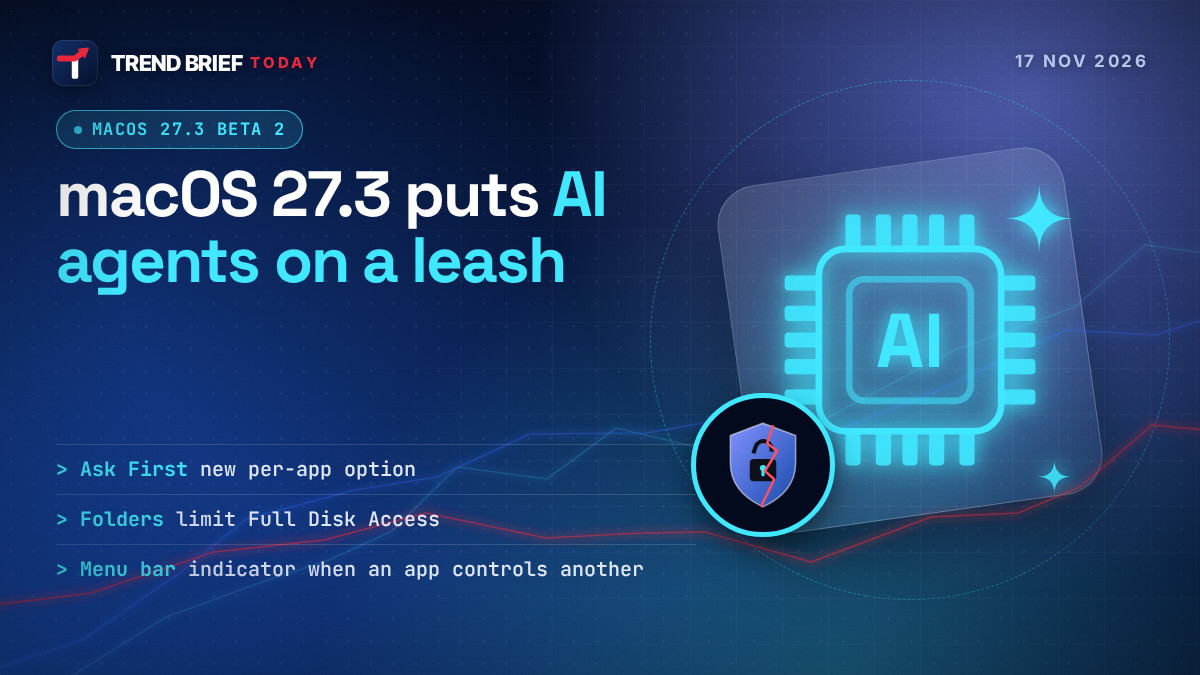
macOS 27.3 changes how Mac apps, and AI agents in particular, get broad access to your files and other apps. Apple is splitting the old "Device Control and Data Access" setting into System & App Protection Override and Accessibility, letting you give an app only chosen folders or apps instead of Full Disk Access, adding an "ask every time" option and showing a menu bar indicator when one app is controlling another. The changes are in macOS 27.3 beta 2, released on 16 November 2026. Apps you have already approved keep their access.[1][4][5][6]
 | |
| Announced | 16 November 2026[1][6] |
|---|---|
| First warning | 2 October 2026[2][5] |
| Build | macOS 27.3 beta 2[1][10] |
| Old setting | Device Control and Data Access[1][5] |
| New settings | System & App Protection Override; Accessibility[1][4][6] |
| Full Disk Access | Still available; can be limited to chosen folders[3][5][7] |
| New option | Ask every time[1][5] |
| Existing approvals | Stay in effect[1][6] |
| Public release | Not announced[1][11] |
What changes in macOS 27.3
Apple listed six changes in a note to developers on 16 November, the day the second beta came out.[1] In plain terms:
- Two settings instead of one. "Device Control and Data Access" becomes System & App Protection Override, for apps that need to get round macOS protections to control other apps or run automated tasks, and Accessibility, which is meant for assistive technology.[1][5][6]
- One way to grant access. You approve a request by picking the app that asked from a list.[1][6]
- Smaller grants. macOS nudges you to allow only the specific apps (for the override) or folders (for Full Disk Access) that your workflow needs.[1][4][9]
- Clearer warnings. Before you allow full access, the Mac spells out what kinds of data the app could reach or control.[1][5][6]
- Ask every time. You can set an app to ask for permission each time it needs access instead of keeping it indefinitely.[1][5][9]
- A menu bar indicator. When one app is controlling another through System & App Protection Override, an indicator shows in the menu bar.[1][5][6]
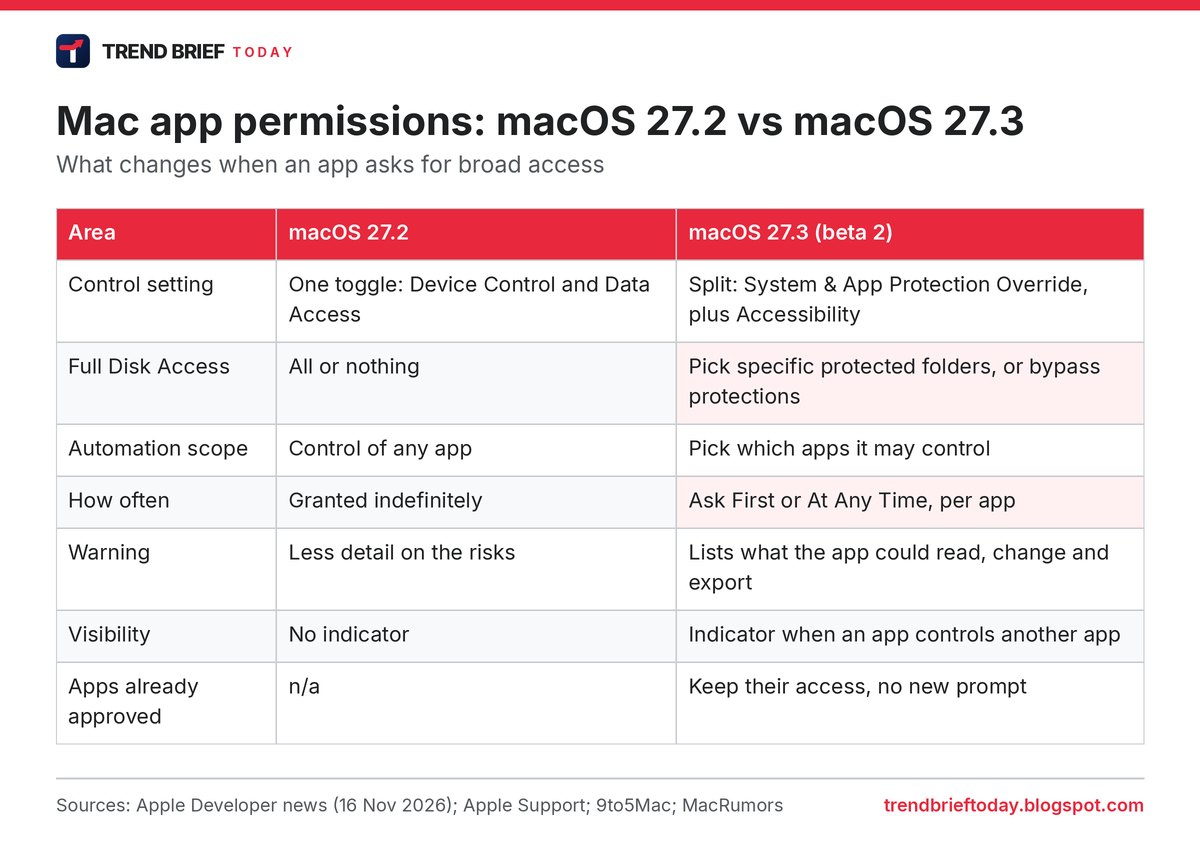
The important thing is what does not change. Full Disk Access is not being removed. If you decide an app really needs it, you can still give it, but you go through a longer approval with a more detailed explanation first.[5][7] Federico Viticci of MacStories, who had worried that Apple would kill the feature, called the result "a better system than before".[7]
Why Apple is doing this: AI agents
The reason is AI agents. Unlike a chatbot that only answers questions, an agent running on a Mac can take actions across files, apps and settings for you.[4] To do that, many agent apps ask for Full Disk Access or full control of other apps.[4][7]
Apple flagged the problem on 2 October. It said Full Disk Access "largely sidesteps" its normal privacy controls so that backup apps can work, and that some developers were using it in ways that could expose files, mail, messages and browsing history without users fully understanding.[2][6] It added that as agents become "increasingly capable and autonomous", the risks of that level of access "will grow substantially".[2][5] The November note puts it more bluntly: giving an app this access "puts all of the data on their Mac at risk".[1][4]
TechCrunch's view is that the changes do not stop anyone installing or running AI agents. They give users more choices and more information instead.[4] 9to5Mac reads them the same way: the all-or-nothing switch gains a middle option.[5]
What you are agreeing to if you bypass protections
Apple's new support page lists the actions macOS 27.3 asks you to confirm when you click Bypass System Protections. For Full Disk Access, that is reading, changing, deleting and exporting all your data, viewing hidden and recently deleted photos, and browsing as you on websites. System & App Protection Override adds two more: controlling your Mac, apps and settings, and monitoring everything you do.[3]
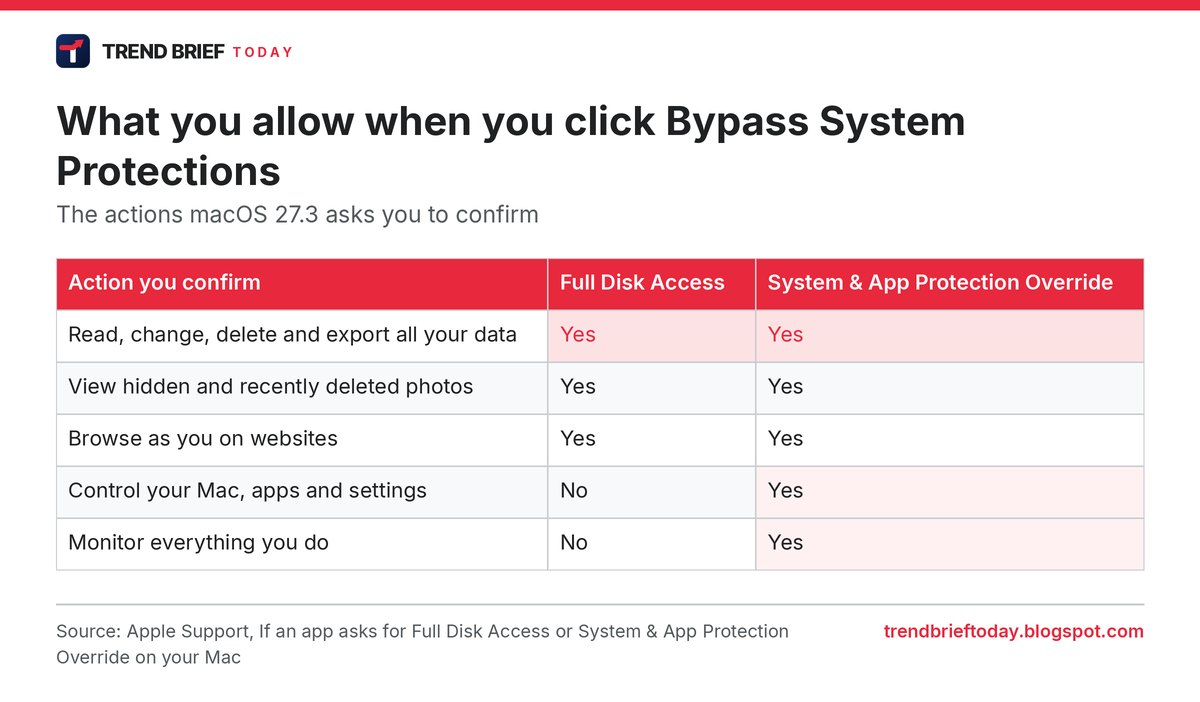
Apple's support page also says an app given the full override "can also see every window and app, including ones in the background, and capture every keystroke".[3][7] That is why the override, not Full Disk Access, is the setting AI agent users should think hardest about.
How to limit an AI agent to certain folders or apps
When an app asks for one of these permissions in macOS 27.3, the prompt offers Choose Folder or Choose Apps as well as Bypass System Protections.[3][7] Apple's advice is to check the app's setup instructions, pick only the folders or apps it needs, and contact the developer if you are not sure.[3]
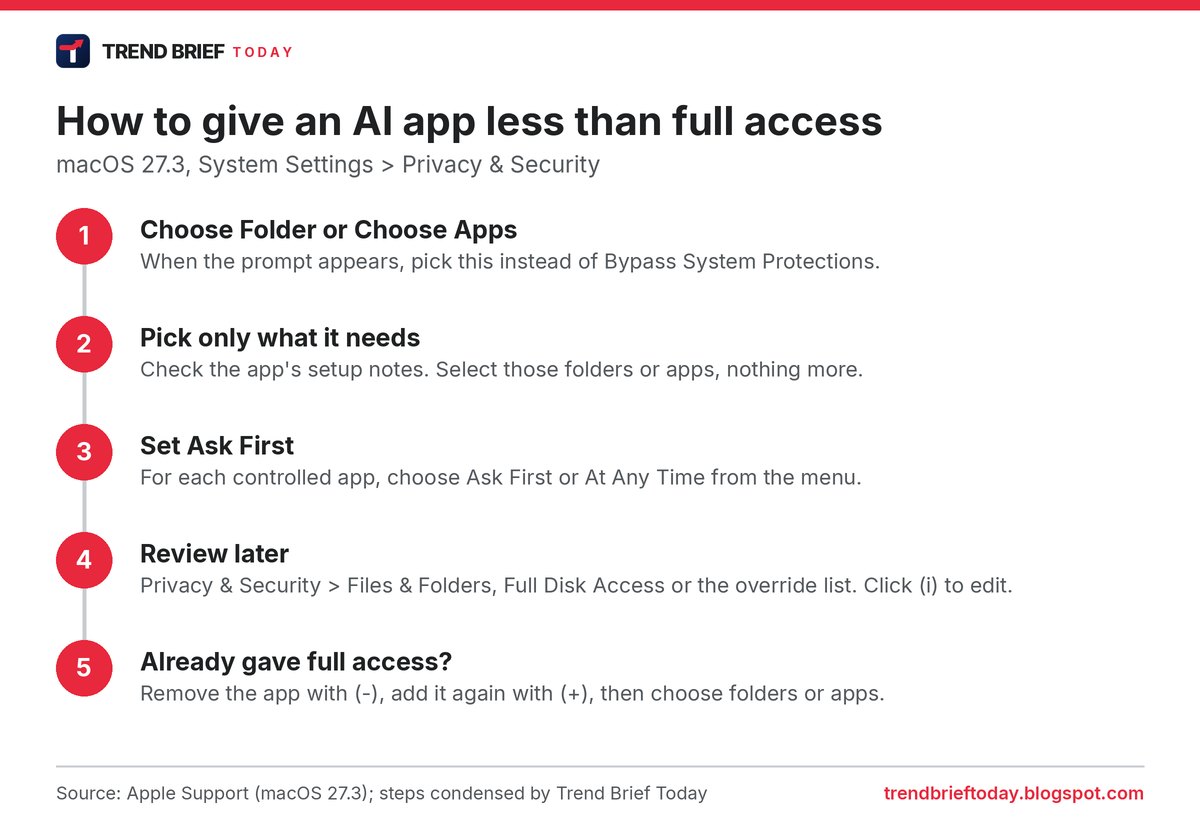
For apps under System & App Protection Override, each controlled app gets its own menu with two choices: Ask First or At Any Time.[3] Ask First is the "ask every time" option Apple described to developers.[1][3] TechCrunch notes it may feel tedious and get in the way of true automation, but it lets you try a local agent without giving it free rein.[4]
You can change these choices later in System Settings under Privacy & Security, in Files & Folders, Full Disk Access or System & App Protection Override. If an app already has full access and you want to scope it down, Apple says to remove it and add it again, then choose specific folders or apps when asked.[3]
Will my existing apps stop working?
Probably not. Permissions you granted before macOS 27.3 stay in effect, and you only see the new flow when an app makes a new request.[1][5][9] Apple says it has already identified popular apps that rely on these permissions and that they keep working without changes.[1][5]
Developers of backup apps that use Full Disk Access, and of assistive apps that use the new Accessibility setting, can ask Apple for an "entitlement" so new installs work as they did before 27.3. Apple says more entitlement details are coming.[1][4][6] Other developers are told to adjust their onboarding and make sure their apps "gracefully handle" access to only some folders or apps.[1][6][9]
| If you use | What changes | What to do |
|---|---|---|
| An AI agent app (new install) | Longer approval with choices[1][5] | Pick folders or apps; try Ask First[3] |
| An AI agent you already approved | Nothing; access stays[1][6] | Remove and re-add it to limit it[3] |
| A backup app | Developer can request an entitlement[1][4] | Update the app when the developer does[1][6] |
| A window manager or automation tool | Menu bar indicator while it controls apps[5][9] | Live with it, or see the section below[8] |
The new menu bar indicator
The indicator is a blue pill in the menu bar that appears while an app is using System & App Protection Override to control another app.[5][8] It is designed to tell you when an automation tool is working with your apps in the background.[5]
Not everyone likes it. Help Net Security reports that early testers on Reddit complained the reminder cannot be dismissed, with one calling it "super annoying" for apps they had already approved, such as window managers.[9] 9to5Mac found an undocumented Terminal command that switches the indicator off after a restart on beta 2, and MacStories also noted the workaround.[8][7] It relies on an internal feature flag and Apple could remove it in a later beta, so we would not use it on a Mac where you depend on that warning.[8]
The Siri AI question
MacStories raised one point of criticism. Apple's own Siri AI has capabilities on a par with Full Disk Access, Viticci wrote, but does not go through the same permission flow or appear in the Full Disk Access list.[7] He still concluded that the new controls could help third-party agents, because people who do not fully trust a company's app can now limit it to specific folders.[7]
That is the trade-off in a sentence: Apple keeps power users happy, since they can still click through and give tools like Codex or Claude full access, while everyone else gets a native way to say "only this folder".[7]
When is macOS 27.3 released?
Apple has not said. Developer beta 1 came out about two weeks before beta 2, followed a few days later by a public beta, and beta 2 arrived on 16 November.[10][1]
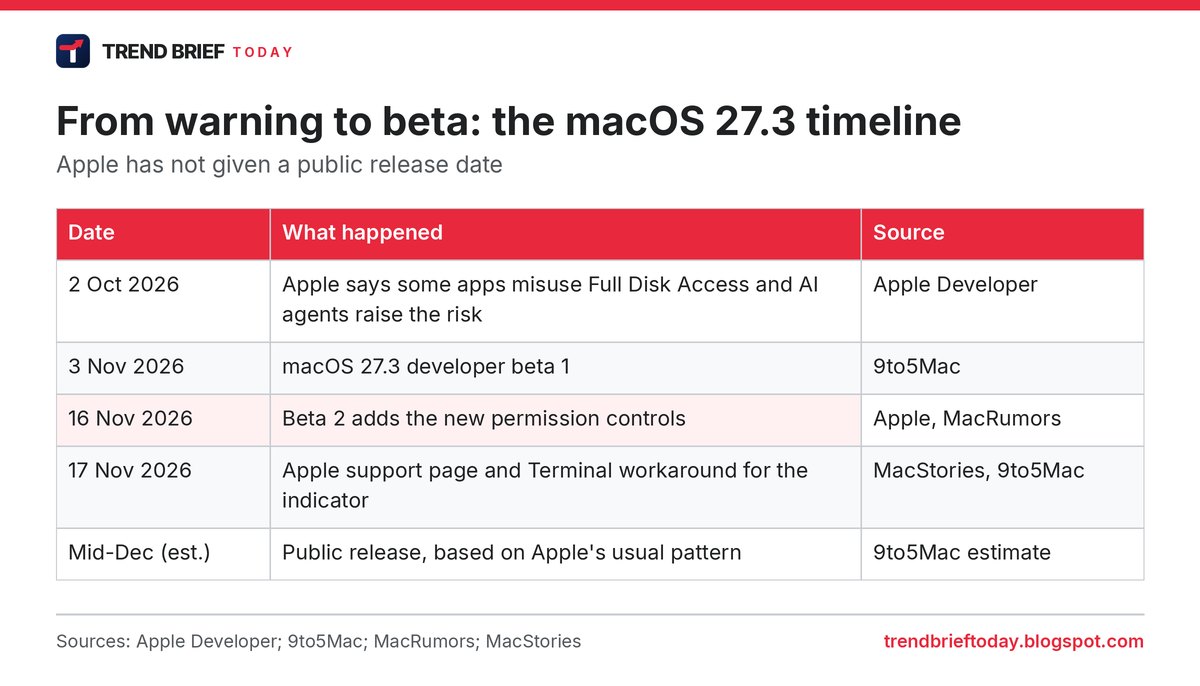
9to5Mac expects iOS 27.3 to reach the public in mid-December, based on when Apple shipped comparable updates in past years and its habit of releasing the last update of the year before the holiday break.[11] The Mac and iPhone 27.3 betas have so far arrived on the same day.[10][6] Treat December as an estimate, not a date.
Frequently asked questions
Is Apple removing Full Disk Access in macOS 27.3?
No. You can still give an app Full Disk Access, but macOS 27.3 explains the risks first and lets you choose specific folders instead.[3][5][7]
What is System & App Protection Override?
A new macOS 27.3 setting for apps that need to get round built-in protections to control other apps or run automated tasks. It replaces part of the old Device Control and Data Access setting; the other part becomes Accessibility.[1][5][6]
Do I need to re-approve my apps after updating?
No. Permissions granted before macOS 27.3 stay in effect. The new prompts only appear for new requests.[1][6][9]
Can I make an AI agent ask before it controls an app?
Yes. Under System & App Protection Override, set the app to Ask First instead of At Any Time.[3][5]
Can I turn off the macOS 27.3 menu bar indicator?
Apple gives no setting for it. 9to5Mac found an undocumented Terminal workaround in beta 2, which Apple may remove.[8][9]
Is macOS 27.3 out yet?
Not for the public as of 17 November 2026. It is at developer beta 2.[1][10]
References
- "Updates to Device Control and Data Access, and Full Disk Access in macOS". Apple Developer. 16 November 2026. Retrieved 17 November 2026.
- "Updates to Full Disk Access in macOS". Apple Developer. 2 October 2026. Retrieved 17 November 2026.
- "If an app asks for Full Disk Access or System & App Protection Override on your Mac". Apple Support. Retrieved 17 November 2026.
- Sarah Perez. "Apple reveals new Mac security controls as AI agents raise privacy risks". TechCrunch. 16 November 2026. Retrieved 17 November 2026.
- Chance Miller. "macOS 27.3 includes new privacy controls for Full Disk Access and more". 9to5Mac. 16 November 2026. Retrieved 17 November 2026.
- Juli Clover. "macOS 27.3 Warns Against Giving AI Apps Full Mac Control". MacRumors. 16 November 2026. Retrieved 17 November 2026.
- Federico Viticci. "macOS 27.3's Full Disk Access Changes Are Better Than I Feared". MacStories. 17 November 2026. Retrieved 17 November 2026.
- Zac Hall. "How to hide the new macOS 27.3 menu bar indicator". 9to5Mac. 17 November 2026. Retrieved 17 November 2026.
- Anamarija Pogorelec. "Apple splits Mac app permissions fearing overreaching AI agents". Help Net Security. 17 November 2026. Retrieved 17 November 2026.
- Marcus Mendes. "macOS 27.3 beta 2 now available, here's what's coming". 9to5Mac. 16 November 2026. Retrieved 17 November 2026.
- Ryan Christoffel. "iOS 27.3 release date: Here's when to expect new iPhone features". 9to5Mac. 29 October 2026. Retrieved 17 November 2026.