Windows baseline protection is a new Windows 11 security check that rolls eight existing protections, including Secure Boot, the TPM and memory integrity, into one yes or no answer that apps can read. If your PC fails, each app's developer decides what happens: carry on, warn you, switch off a feature or refuse to run. Microsoft announced it at Ignite on 17 November 2026; it is in preview for Windows Insiders now, with general availability planned for 2027.[1][3] Adobe, Blizzard's Battle.net, 1Password, Raycast and the exam tool Schoolyear are testing it, and none of them has said it will block PCs that fail.[1][4] Below: the eight checks and how to test each one on your own PC today, our maths on why an all-or-nothing rule bites harder than it looks, and who is most likely to fail.
 | |
| What it is | One pass or fail security state for a Windows 11 PC[1] |
|---|---|
| Checks | 8 protections; all must be on[1][6] |
| Who can read it | You (Settings), IT admins, and apps[1] |
| Answer formats | Yes or no, list of missing items, or a hardware-backed token[1] |
| What apps may do | Allow, warn, gate a feature, reduce, log or block[1] |
| Early partners | Adobe, Battle.net, 1Password, Raycast, Schoolyear[1] |
| Where to find it | Settings, Security, Baseline protection[2][3] |
| Status | Windows Insider preview[1][5] |
| General availability | Planned for 2027[1] |
| Announced | 17 November 2026, Microsoft Ignite[1][3] |
What Microsoft announced
Windows 11 already has a stack of security features: a TPM security chip, Secure Boot, virtualization-based security (VBS), memory integrity and strict driver rules. The trouble, as Microsoft admits, is that they are separate settings, often set differently on every PC, so nobody could easily tell whether a given machine had them all on.[1]
Baseline protection replaces that patchwork with what Microsoft calls "a versioned, attestable device security state". A PC reports true only if it meets every requirement; otherwise it reports false.[1] Windows works the answer out at boot, using measurements from the security processor, and switching any protection off needs a restart, so an app only has to ask once per session.[1][4]
An app can get the answer in three forms: a plain yes or no, a detailed report of which items are missing, or a hardware-backed attestation token that the developer checks on its own servers.[1] That last one matters. A local check can be faked by cheat tools or malware; a token signed by the security chip is much harder to spoof, as Windows Latest points out.[3]
The line Microsoft wants developers to remember is from Brandon Bray, who leads the work: "The platform reports the state; you own the policy."[1][3] In plain English, Microsoft is not blocking anything. It hands apps a trusted score and lets them choose.
The eight checks, and how to test each one today
The first version requires eight protections. Microsoft's support page lists seven, because it folds the two driver-signing rules into one "test signing" entry.[1][2][3] The new Settings page only exists on Insider builds so far, so we added the column you actually need: how to check each item on a normal Windows 11 PC right now, with tools that are already built in.
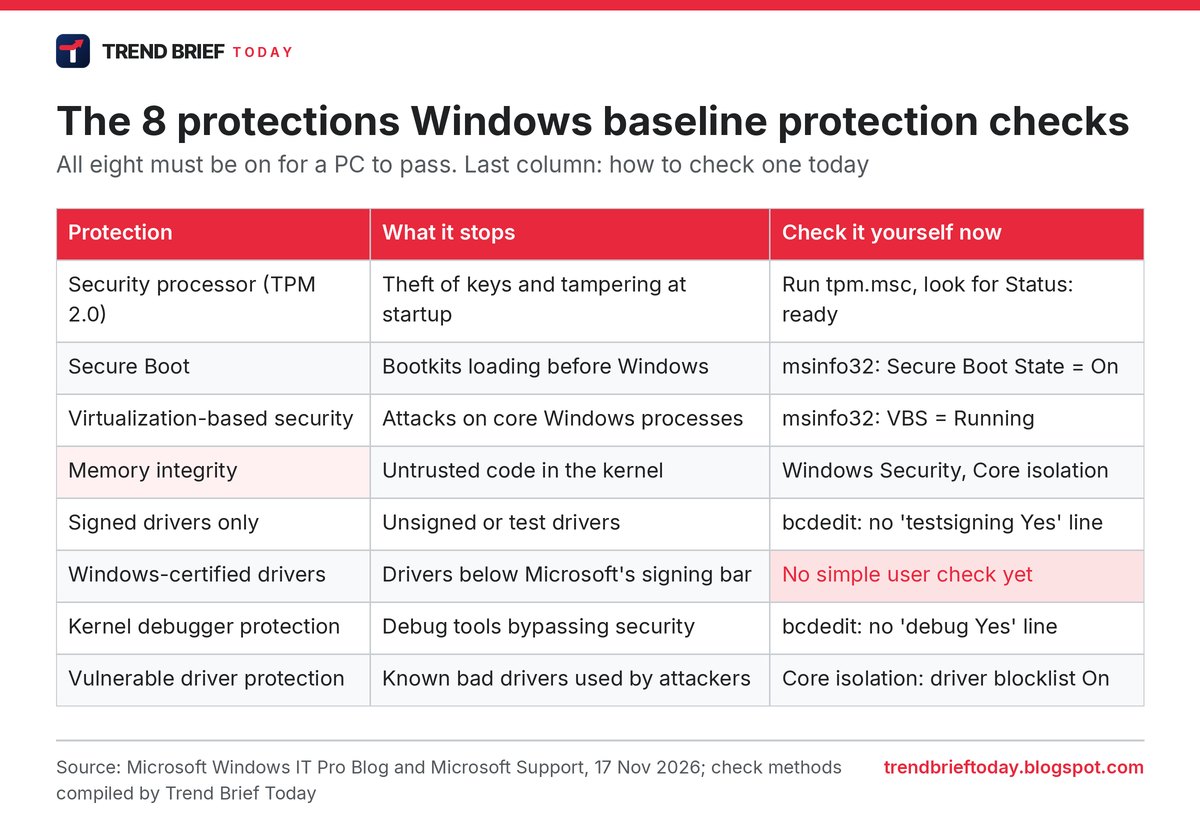
A few notes from going through the list. The bcdedit checks need an administrator Command Prompt; run bcdedit /enum {current} and look for lines reading testsigning Yes or debug Yes. If those lines are missing, the setting is off, which is what you want. Secure Boot and the TPM cannot be switched on from inside Windows on most PCs, because they live in the UEFI firmware, and Microsoft says Windows will guide you through that with an advanced restart.[1][3]
"Windows-certified drivers" is the odd one out. There is no simple switch a home user can look at for it today, which is why our table marks it in red. On most PCs bought in the last few years it should already pass, but we would wait for the Settings page rather than guess.
Why one switch can fail the whole PC: our numbers
The rule is all or nothing. Seven out of eight is a fail.[1][6] That sounds fine until you do the maths, so we did. Microsoft has not published how many PCs pass each check, so the chart below is an illustration, not a measurement: if every check were passed by the same share of PCs, independently, the share passing all eight is that number to the power of eight.
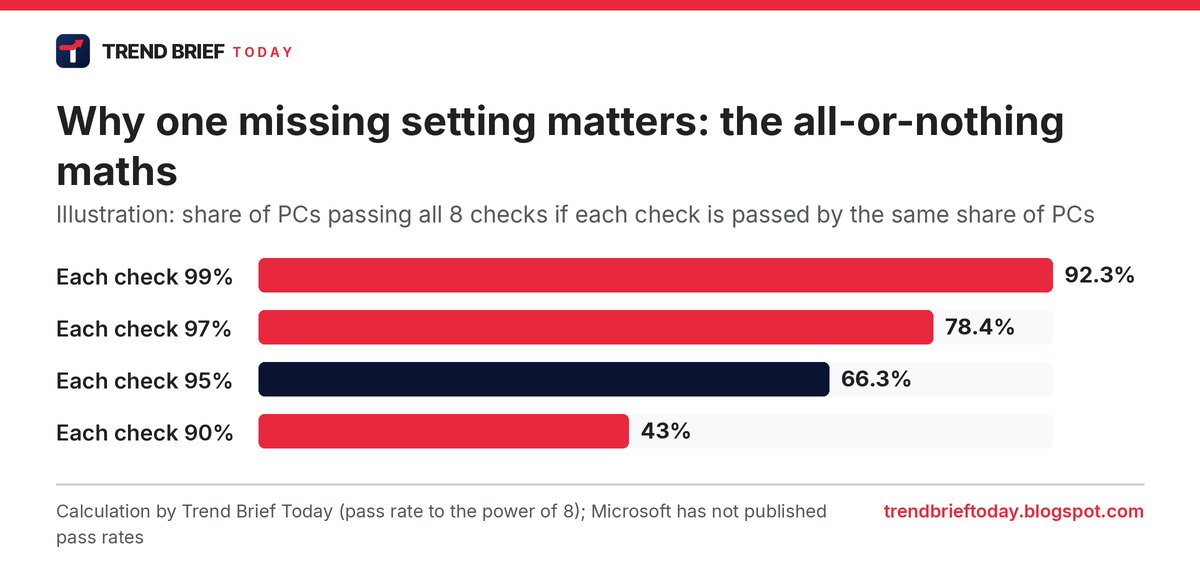
At 99% per check, 92.3% of PCs would pass. At 95% per check, only 66.3% would, so roughly one PC in three fails even though each setting on its own looks almost universal. In real life the settings are linked (a PC with VBS running usually has a TPM too), so the true figure will sit somewhere else. The point stands, though: a single forgotten toggle is enough, and the people most likely to have forgotten toggles are the ones below.
Who is most likely to fail
PC gamers who turned off memory integrity. Microsoft itself suggested in 2022 that gamers could switch memory integrity off for better frame rates. Windows now turns it on automatically on more PCs, but if you turned it off yourself, Windows leaves it off, and your PC fails the baseline.[3][4] Wccftech also notes concerns about memory integrity clashing with undervolting tools on some setups.[6]
Linux dual-booters. Many people disabled Secure Boot to install Linux alongside Windows. That is an automatic fail.[3] Most big Linux distributions now boot with Secure Boot on, so it may be worth checking whether you still need it off.
Developers and tinkerers. Test-signing mode and the kernel debugger are developer tools. Both are on the list, so a PC set up for driver work will not pass.[2]
Virtual machines. Windows Latest's own tester asks whether a VM can pass without a virtual TPM and Secure Boot.[3] Hyper-V and VMware can provide both, but older VMs set up without them will likely fail.
Old PCs that only just run Windows 11. Every machine that officially runs Windows 11 has TPM 2.0 and Secure Boot support, but having the hardware is not the same as having it turned on.
How to check if your PC would pass
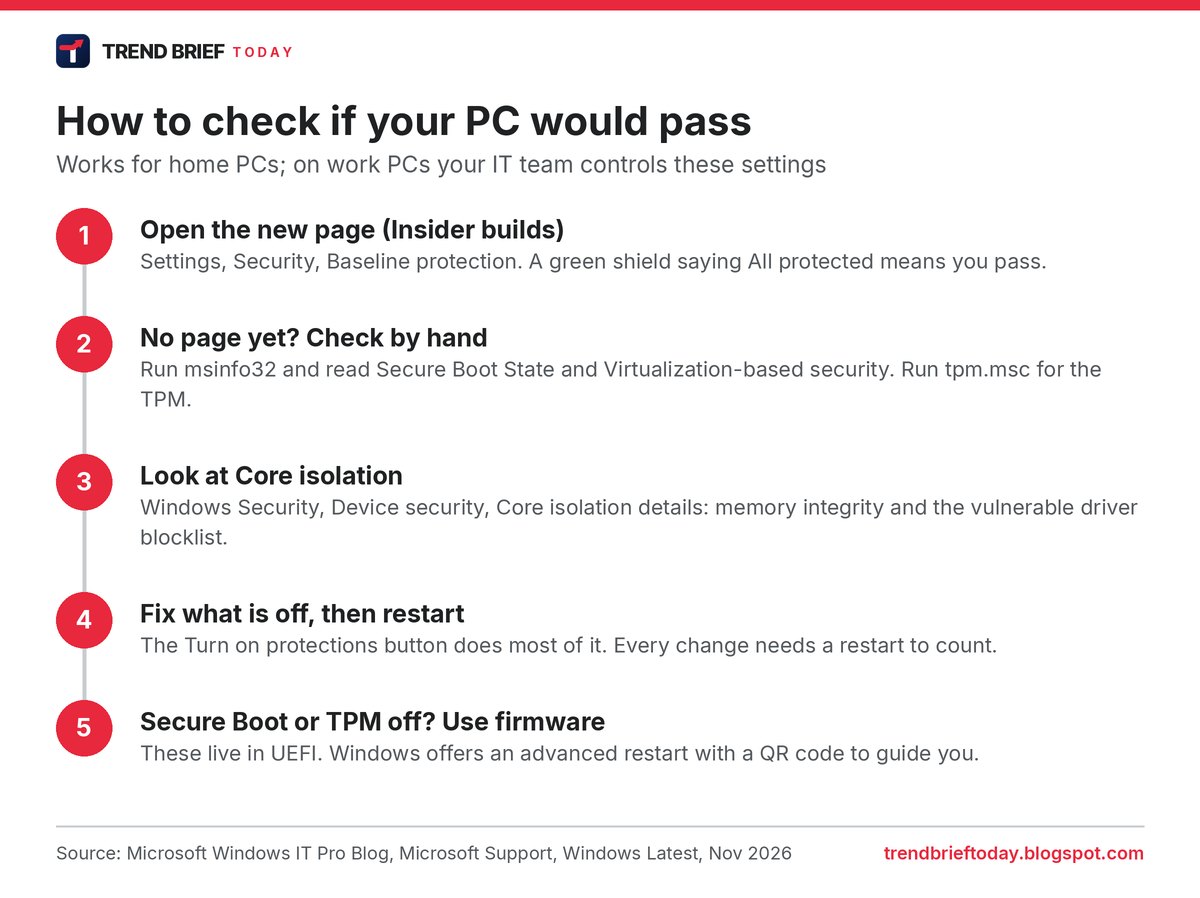
On an Insider build, go to Settings, Security, Baseline protection. A green shield with "All protected" means you pass. A yellow "Attention needed" shield lists what is missing, and a Turn on protections button switches on whatever Windows can, followed by a restart.[1][2][3] That Security page is itself new: Microsoft has split it away from Privacy, and is adding firewall controls next to the network and internet settings.[1][3]
On a work PC, you may not be able to change any of this. Microsoft says IT admins manage it through the Microsoft 365 admin center's Baseline Security Mode or Intune, where they can make the baseline a condition for accessing company resources.[1]
What apps will do with it
Apps already run their own checks. Microsoft's examples are a bank app testing for a TPM, a game's anti-cheat looking at driver signing, and an exam proctoring tool checking Secure Boot.[1] Battlefield 6, for example, will not start without Secure Boot because of EA's Javelin anti-cheat.[3] Baseline protection gives all of them one shared answer instead.
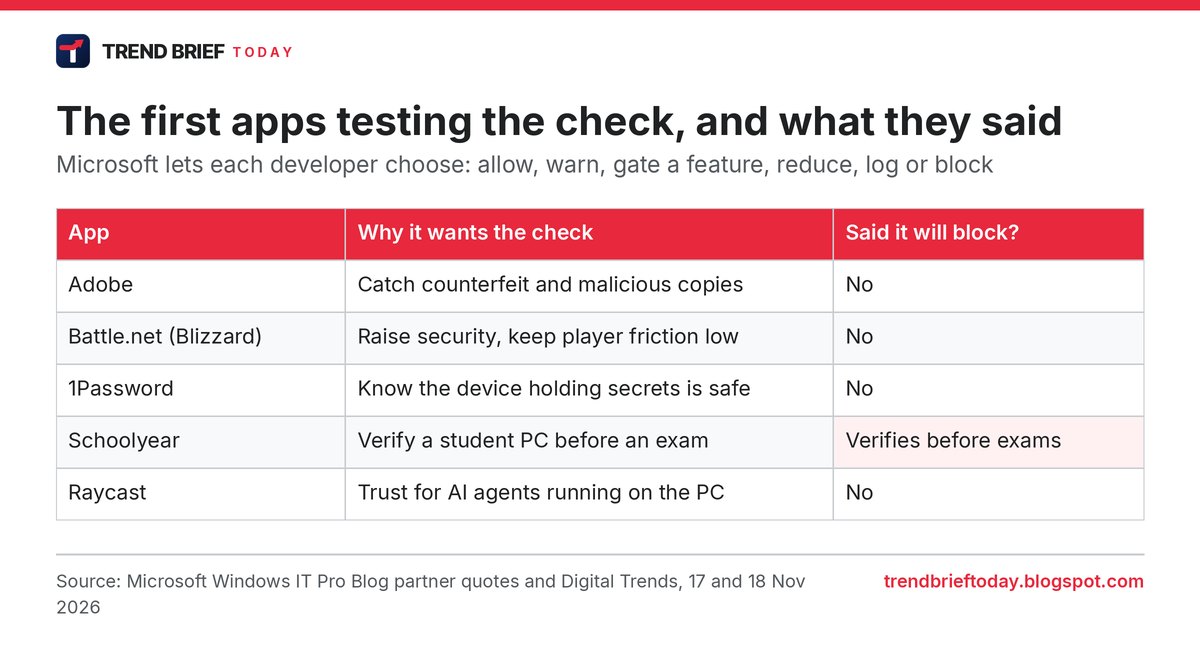
Look at what the partners actually said. Adobe's Michael Draper talks about catching "counterfeit and malicious software". Blizzard's John Yaney says the framework helps Battle.net raise its security "while minimizing player friction". Schoolyear's Gergely Homonnai says the API lets it "verify compliance before the exam starts".[1] Not one of them says "we will block you", and Digital Trends and Wccftech both note that no partner has confirmed blocking.[4][6]
Our read: exam and banking apps are the most likely to block outright, because a failed check there already means "do not proceed" in their own tools. Games are the interesting case. Anti-cheat makers have every reason to want a signed, unspoofable answer about the kernel, and the token gives them exactly that. We would not be surprised if competitive online games are the first place ordinary users meet a hard block, sometime after the 2027 launch.
Is this good or bad for users?
Mostly good, with one real catch. The good part: one page instead of digging through Windows Security, Core isolation and firmware menus, with a button that fixes most problems.[3] PCWorld calls it a dashboard that "takes the guesswork out" of securing a PC.[5]
The catch is that the bar moves. Microsoft calls this version "the floor, not the ceiling" and says the criteria will grow.[1] So a PC that passes today might not pass version two, and the apps you use decide what failing costs you. Microsoft also tells developers to test their apps on PCs with every protection on, which quietly puts pressure on any app that only works with something switched off.[1]
And it is not a malware shield. Windows Latest makes the useful distinction: Smart App Control decides whether an app can be trusted, while baseline protection tells the app whether your PC can be trusted.[3] Passing does not make shady downloads safe. For the server side of this month's security news, see our explainer on the NGINX vulnerability CVE-2026-123007.
Timeline
| Date | Event | Why it matters |
|---|---|---|
| 2022 | Microsoft suggests gamers can turn memory integrity off for performance[3] | Many gaming PCs still have it off, which now means a fail |
| February 2026 | Microsoft sets out a "secure by default" plan for Windows[1][3] | Baseline protection is the first concrete result |
| 17 November 2026 | Baseline protection announced at Ignite, preview for Insiders[1] | Apps can start testing the check |
| 2027 | General availability planned[1] | Ordinary Windows 11 PCs get the Settings page |
| After 2027 | Further versions with more criteria[1] | A PC that passes now may not pass later |
Frequently asked questions
What is Windows baseline protection?
A Windows 11 feature that checks eight built-in security protections at boot and turns them into one pass or fail result that you, your IT team and apps can read.[1]
Will apps stop working on my PC?
Not today. It is an Insider preview, general availability is planned for 2027, and each developer decides whether to warn, limit or block. No early partner has said it will block.[1][4]
Which security features does it check?
The security processor (TPM), Secure Boot, virtualization-based security, memory integrity, signed drivers only, Windows-certified drivers, kernel debugger protection and vulnerable driver protection.[1]
Where do I find it in Settings?
Settings, Security, Baseline protection, on Insider builds that have the feature.[2][3]
Does it slow down games?
The check itself runs at boot. Memory integrity, one of the required protections, can cost some performance on certain setups, which is why some gamers turned it off.[3][6]
Does Windows 10 get it?
Microsoft has only announced it for Windows 11.[1]
References
- Brandon Bray, Microsoft Windows IT Pro Blog, "A verifiable security state with Windows baseline protection", 17 November 2026.
- Microsoft Support, "Stay protected with Baseline protection in Windows", accessed 19 November 2026.
- Abhijith, Windows Latest, "Apps could soon refuse to run on your Windows 11 PC if it fails Microsoft's new security check, and Adobe and Battle.net are already on board", 18 November 2026.
- Digital Trends, "Microsoft is letting apps check your Windows 11 security, and they can refuse to run if your PC fails", 18 November 2026.
- PCWorld, "Microsoft's new tool checks your PC's core security in one place", 18 November 2026.
- Wccftech, "Microsoft's New Windows 11 Security Check Could Block Apps From Running On Unprotected PCs, Adobe And Blizzard On Board", 18 November 2026.