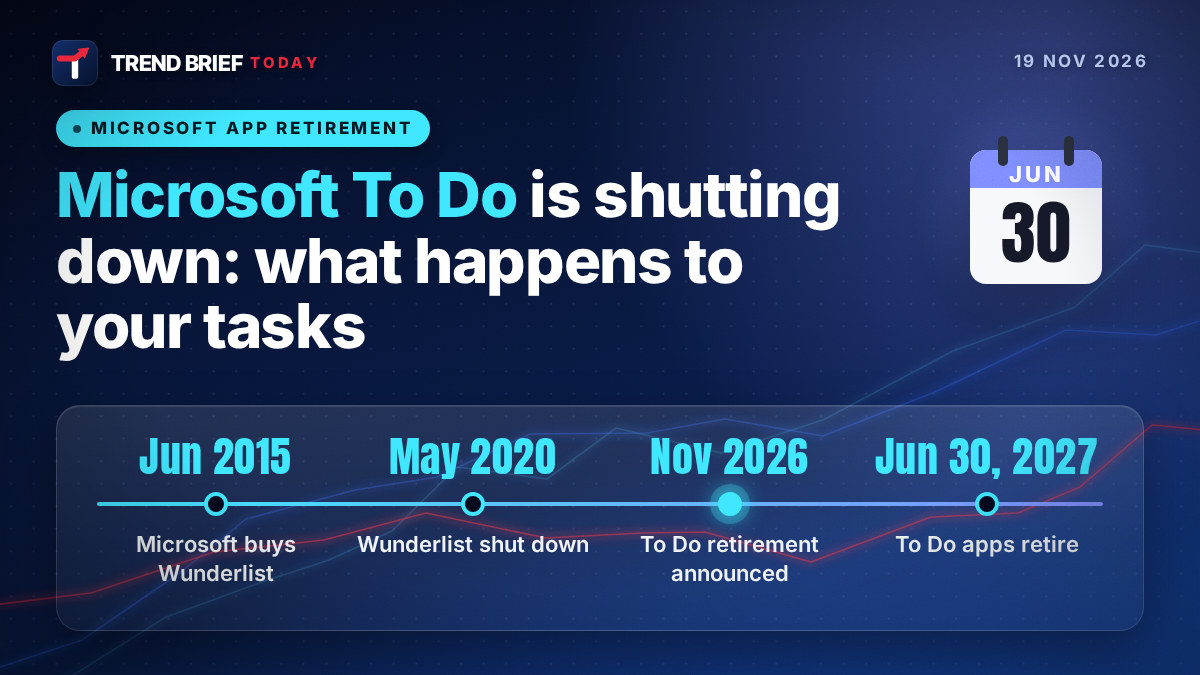
Microsoft is shutting down To Do. The apps on Windows, Mac, iPhone, Android and the web will retire on June 30, 2027, for work, school and personal accounts alike, which leaves 223 days from today.[1] Your existing tasks will not be moved anywhere automatically. Work and school users are being pointed to Planner, but Microsoft's own advice to people on personal accounts, including paying Microsoft 365 Personal and Family subscribers, is to "choose another task-management application".[1][2] Below: what changes and when, what you lose, who is affected, what the alternatives cost and a seven-month plan to get out cleanly.
 | |
| Announced | 18 November 2026[2] |
|---|---|
| Apps retire | June 30, 2027 (web, Windows, Mac, iOS, Android)[1] |
| Accounts affected | Work, school and personal, incl. Microsoft 365 Personal and Family[1] |
| Replacement | Planner (work and school only)[1] |
| Task migration | None; old tasks visible in Planner until June 30, 2027[1] |
| Export tool | Promised, not yet released[1] |
| APIs and sync | Retire later, date to be announced[1][2] |
| Origin | Built by the Wunderlist team after Microsoft bought it in 2015[3][6] |
What Microsoft announced
The news came out sideways. On 18 November the Planner team published a long post about "unified plans", a single system for tasks in Outlook, Teams, Planner, Loop and Copilot. Near the bottom it says: "As we bring personal task management into Planner, we will phase out To Do. The To Do apps will retire on June 30, 2027."[2] A support article published alongside it fills in the detail. All the To Do apps go on that date, on the web, Windows, Mac, iOS and Android, for both work or school accounts and personal Microsoft accounts.[1]
The phrase people will miss is "app retirement". Microsoft is careful to say that the underlying To Do service, its APIs and sync "will retire on separate, later timelines", and that the app retirement "does not itself schedule existing task data for deletion".[1] So your data does not vanish on 1 July 2027. You just lose every Microsoft app that can show it to you. Windows Latest spotted the documents first, and PCMag UK and Digital Trends confirmed the details on 19 November.[3][4][5]
What happens to your existing tasks
Nothing good, if you were hoping for a button. Microsoft says plainly: "Existing To Do tasks and lists will not migrate to Planner."[1] Work and school users will be able to see their old To Do tasks inside Planner until June 30, 2027, and after that they disappear from view. New private tasks created in Planner will live in a private Planner plan instead, which is a separate store.[1][2]
Microsoft says it will publish a way to export To Do data "before the apps retire", but it adds that an export "does not mean that the content can be imported into Planner or another application".[1] In other words, you will get a copy, not a migration. Windows Latest found that when a user under Microsoft's post asked about a conversion tool, a Microsoft staff member suggested using Copilot or Cowork to move tasks into a private plan, which is only an option on work accounts.[3]
We went through the support article line by line and put every documented difference into one table. These are Microsoft's own words, simplified, not our guesses.[1]
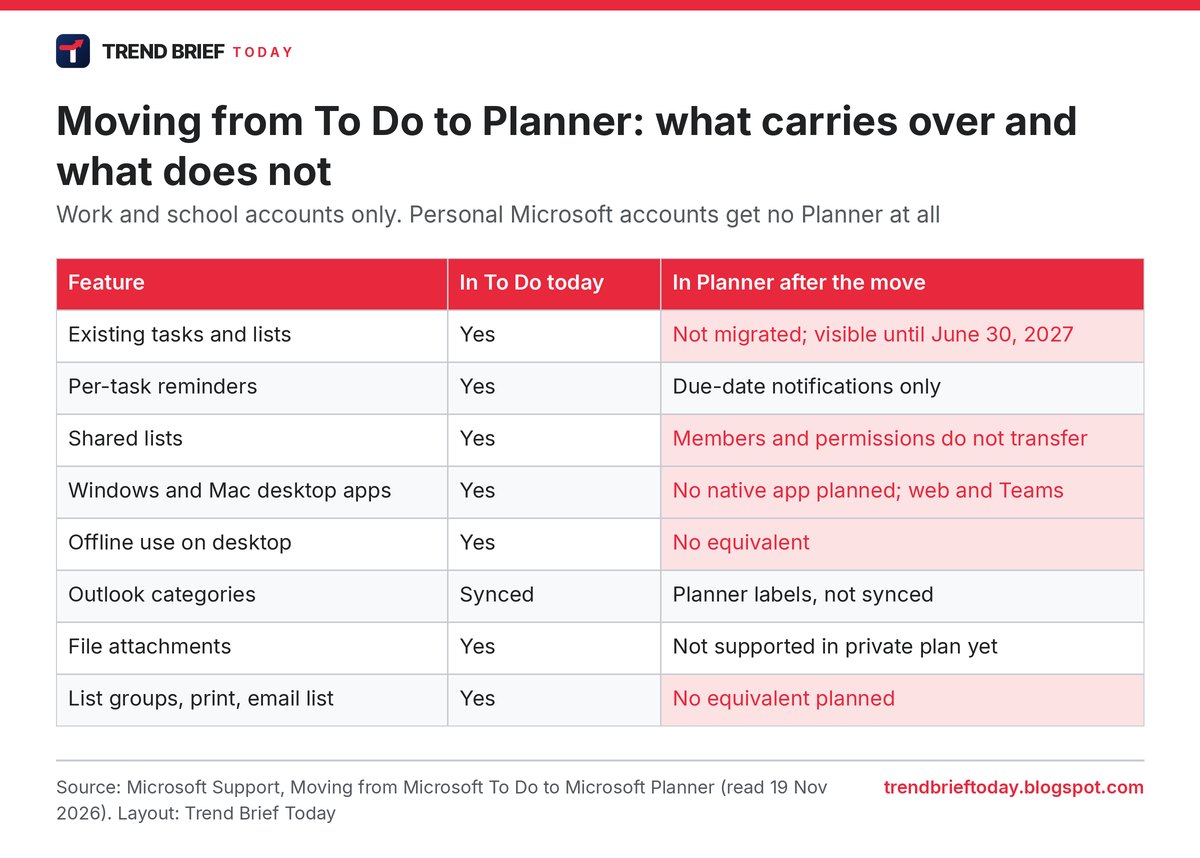
Two rows matter most for heavy users. Reminders change from a time you set on each task to Planner's due-date notifications, so "remind me at 7:30 tomorrow" style use does not carry over cleanly. And Microsoft says native Planner apps for Windows and Mac "are not planned", and the web and Teams versions have no equivalent offline mode on the desktop.[1] If you use To Do on a laptop on a train, that workflow is gone.
Who is affected
The split is by account type, not by device. The surprise is the middle row of the table below. Paying for Microsoft 365 Personal or Family does not get you Planner, because Microsoft says Planner "is not available for these accounts".[1] A family paying for Office, OneDrive storage and Outlook is in exactly the same position as someone on a free Hotmail address.
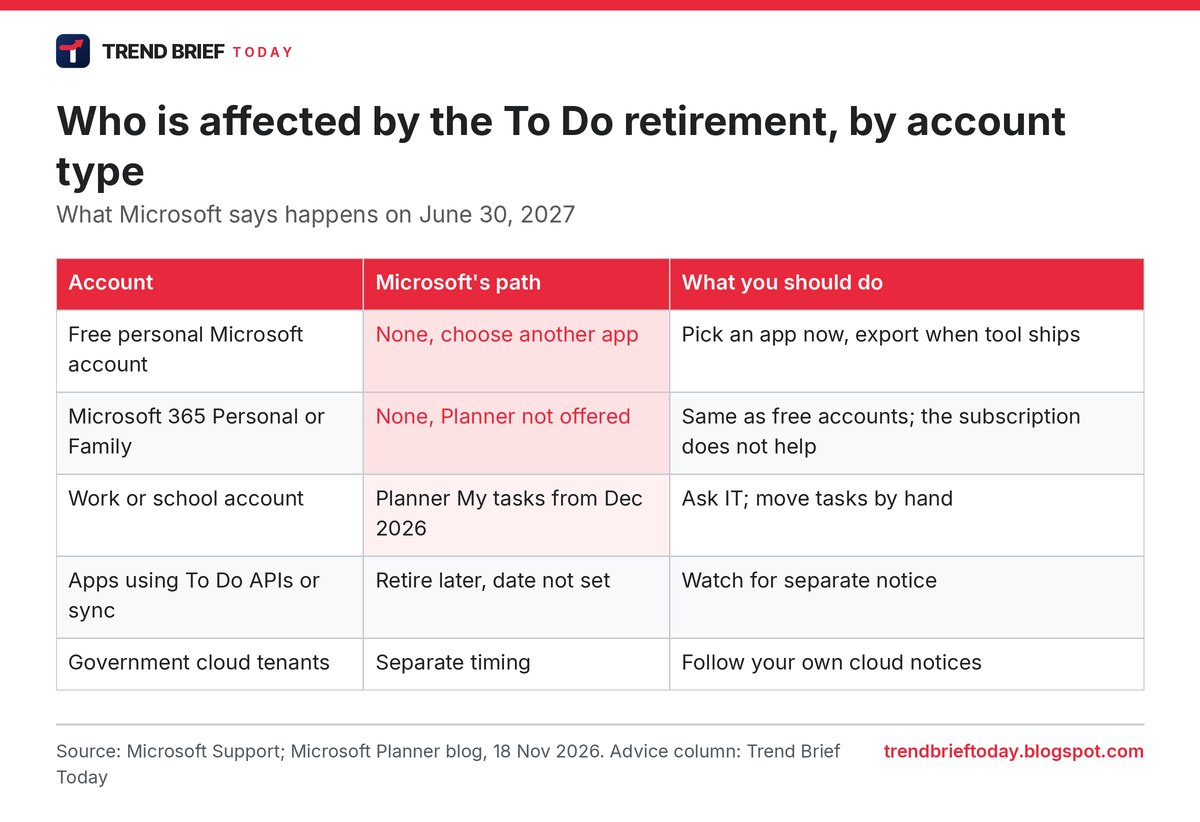
Developers and anyone using a third party app that syncs with To Do get a little more time. Microsoft says connections other apps use to reach To Do tasks "will continue beyond that date", with separate notice before they close.[2] Admins do not get a switch to delay any of this. Microsoft says the change "does not introduce separate administrator controls".[1]
Our analysis: Wunderlist users have seen this before
This is the second time Microsoft has closed the same kind of app. In June 2015 it bought 6Wunderkinder, the Berlin start-up behind Wunderlist, and said the app had "13 million+ customers" who had created more than one billion to-dos. It promised the app would "remain free in all of its existing markets".[6] The price was never published; reports put it at $100 million to $200 million.[3][5] The Wunderlist team then built To Do, and Microsoft shut Wunderlist on May 6, 2020, with an import into To Do.[3]
Some quick maths on that history:
- Wunderlist lasted 4 years and 11 months under Microsoft (2 June 2015 to 6 May 2020).
- At the reported price, Microsoft paid roughly $7.70 to $15.40 for each of Wunderlist's 13 million users.
- To Do will have lived about 7 years after Wunderlist closed (May 2020 to June 2027).
- On Android alone, To Do has 10M+ downloads and a 4.6 star rating from about 485,000 reviews on Google Play, read today.[7] That is a lot of people who rate it highly and now have to move.
The difference this time is the lack of a landing spot. In 2020, Wunderlist users had a free Microsoft app to import into. In 2027, personal users have none, a point Windows Latest and Digital Trends both make.[3][5] Our read: Microsoft wants task data inside Planner, where it is tied to Microsoft 365 business licences and to Copilot and agents, which is how the Planner post frames it.[2] A free consumer list app does not fit that plan. That is our interpretation, not something Microsoft has said.
What the alternatives cost
You do not have to pay to replace To Do. Google Tasks is free with a Google account and Apple Reminders is free on Apple devices. The paid apps that feel closest to To Do, with lists, sharing, recurring tasks and apps on every platform, are mainly Todoist and TickTick. We checked their price pages today and added up three years, which is a fair guess at how long you will stay with whatever you pick next.[8][9]
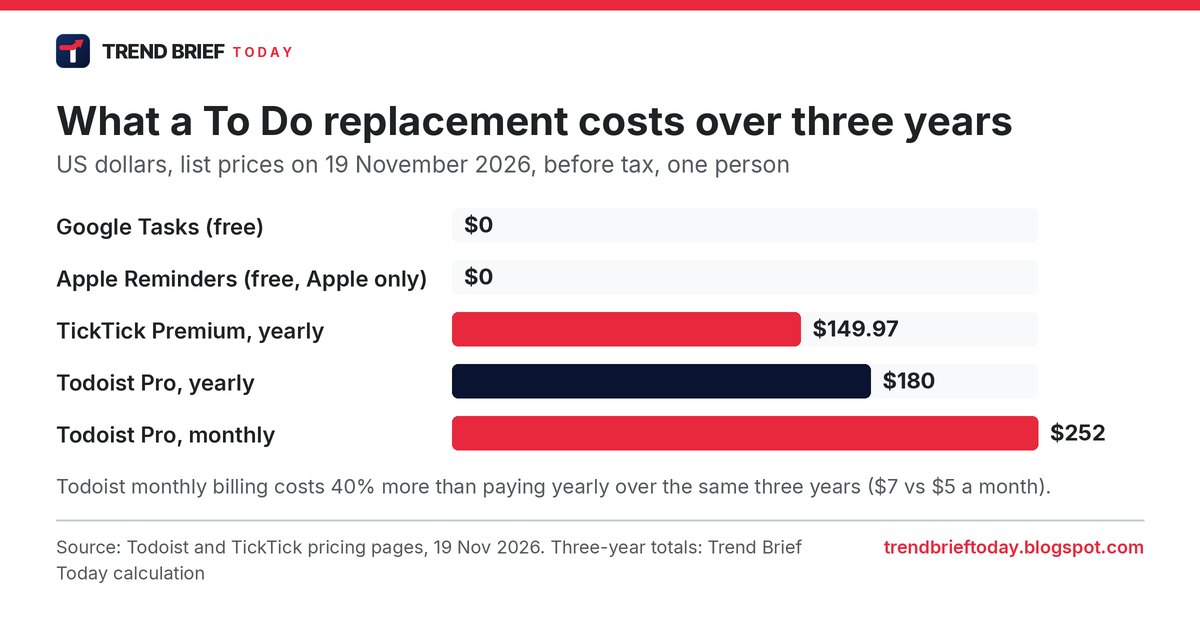
Todoist Pro is $5 a month billed yearly ($60) or $7 billed monthly, and TickTick Premium is $49.99 a year.[8][9] Over three years that is $149.97 for TickTick against $180 for Todoist on a yearly plan; paying Todoist monthly costs $252, 40% more. Prices are before local tax and can differ in the UK, Canada and Australia. Digital Trends also points to Superlist, a newer app from the people who made Wunderlist.[5]
A simple way to choose: if your family is all on iPhone, Apple Reminders is the least friction. If you live in Gmail and Android, Google Tasks. If you need shared lists across mixed devices and Windows desktop apps, that is where the paid apps earn their money.
A seven-month plan to move
There is no rush today, but there is one thing worth doing this week. To Do can still email or print a list, and Microsoft says those features are not planned for the replacement.[1] Until the export tool exists, that is the only built-in way to keep a readable copy of a list you care about.
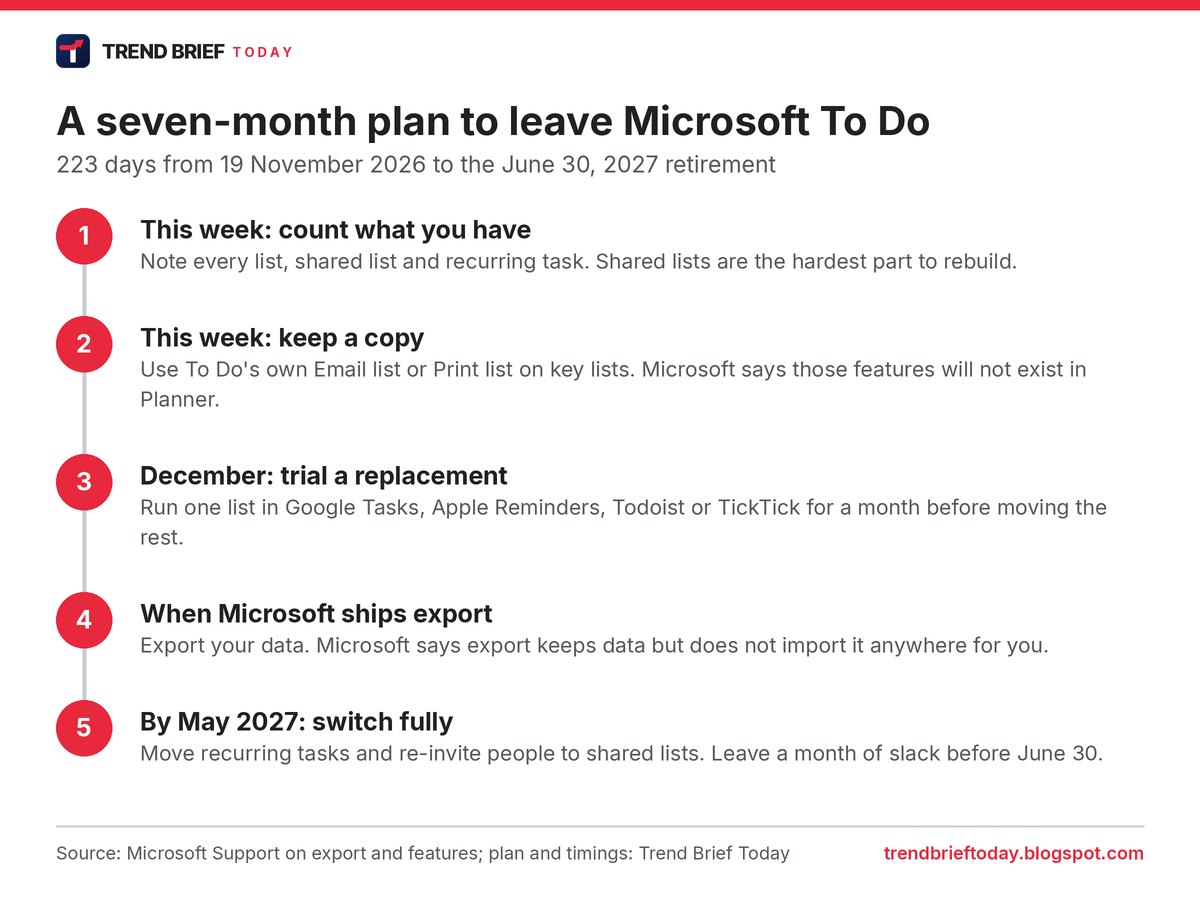
Work and school users should also check that Planner is switched on for them. Microsoft notes that if Planner is disabled in an organisation, affected users will need it enabled first, and some Planner features need extra licences.[1]
Timeline
| Date | Event | Source |
|---|---|---|
| 2 June 2015 | Microsoft buys Wunderlist maker 6Wunderkinder (13 million+ users) | [6] |
| 6 May 2020 | Wunderlist shut down; users import into To Do | [3] |
| 18 Nov 2026 | Planner blog and support page announce To Do retirement | [1][2] |
| December 2026 | Updated "My tasks" in Planner starts rolling out (work and school) | [1] |
| Before June 2027 | Microsoft export tool due (no date yet) | [1] |
| 30 June 2027 | To Do apps retire on all platforms; old tasks leave Planner view | [1] |
| Later, not set | To Do service, APIs and sync retire | [1][2] |
Why it matters
To Do is not a niche app. It came pre-installed on Windows[5], it sits inside Outlook, and it is the free list app millions of people in the US, UK, Canada and Australia use for shopping, bills and work reminders without thinking about it. Taking it away from home users while keeping a version for paying businesses is a clear sign of where Microsoft's consumer apps are heading, the same direction as its recent push to put Copilot into everything we covered in Microsoft's response to Claude Sheets. For security changes coming to the same PCs, see our Windows baseline protection explainer.
Frequently asked questions
Is Microsoft To Do shutting down?
Yes. The To Do apps on web, Windows, Mac, iOS and Android retire on June 30, 2027, for every account type.[1]
Will my To Do tasks be deleted?
Not on that date, according to Microsoft. The app retirement "does not itself schedule existing task data for deletion", but you lose the apps that show it. Export it before then.[1]
Do my tasks move to Planner automatically?
No. Existing tasks and lists are not migrated. Work and school users can see them in Planner until June 30, 2027 only.[1]
What replaces To Do for personal accounts?
Nothing from Microsoft. Planner is not offered to personal accounts, including Microsoft 365 Personal and Family, and Microsoft tells those users to choose another app.[1]
What is the best free alternative to Microsoft To Do?
Google Tasks and Apple Reminders are free. Todoist and TickTick have free tiers, with paid plans from $49.99 a year.[8][9]
How do I export Microsoft To Do?
Microsoft has not released the export tool yet and says it will add instructions to its support page. For now, use Email list or Print list on lists you want to keep.[1]
References
- Microsoft Support. "Moving from Microsoft To Do to Microsoft Planner". Microsoft. Retrieved 19 November 2026.
- Microsoft Planner Blog. "Introducing unified tasks and plans for Copilot and Microsoft 365". Microsoft Tech Community. 18 November 2026.
- Abhijith M B. "Microsoft is killing To Do and telling you to 'choose another' app, after it reportedly paid up to $200 million for Wunderlist and killed it for To Do". Windows Latest. 19 November 2026.
- James Peckham. "Microsoft Is Killing To Do, Leaving You 7 Months to Find an Alternative". PCMag UK. 19 November 2026.
- Rachit Agarwal. "Microsoft is killing To Do, and Wunderlist users will have to relive the same disappointment". Digital Trends. 19 November 2026.
- Eran Megiddo. "Welcome 6Wunderkinder! Microsoft acquires Wunderlist". Official Microsoft Blog. 2 June 2015.
- Google Play. "Microsoft To Do: Lists & Tasks". Store listing. Retrieved 19 November 2026.
- Todoist. "Pricing". Doist. Retrieved 19 November 2026.
- TickTick. "Upgrade". TickTick. Retrieved 19 November 2026.